
The quality of the data you get from Amadora AI depends entirely on the quality of the prompts you track. If you ask the wrong questions, you get irrelevant data.
This guide will walk you through with the “prompt types”. “prompt strategy”, “prompt ideas” and eventually “how to set up in the platform”.
Understanding Prompt Types
Before building your list, it helps to understand the four core types of prompts you can track:- Discovery Prompts: Broad, high-intent queries where users describe a problem or look for tools without naming a specific brand.
- Competitor Prompts: Direct comparisons and “alternative to” queries where users are actively deciding between you and a rival.
- Brand Prompts: Direct questions about your company used to monitor your reputation, pricing accuracy, and feature clarity.
- Audience-Specific Prompts: Niche queries tailored to specific buyer personas, job titles, or industries (e.g., “for enterprise teams”).
The Starter Strategy (7–10 Prompts)
Best for: New users, trial periods, or establishing a quick baseline. Your goal right now is to understand your baseline visibility for the exact problems your product solves. Start with a focused batch of 7 to 10 prompts, heavily prioritizing discovery:- 3-5x High-Intent Discovery Prompts (Highest Priority): These users have a problem but don’t know your brand name yet.
- Example: “Best software for [Your Core Feature]” / “Top tools for [Your Industry]” / “How to solve [Specific Pain Point].”
- 2-3x Direct Competitor Prompts: Check your positioning against your absolute biggest rival.
- Example: “[Your Brand] vs [Top Competitor]” / “Best alternatives to [Top Competitor].”
- 2-3x Brand Reputation Prompts: Ensure the AI isn’t hallucinating your core details or pricing.
- Example: “What is [Your Brand]?” / “Is [Your Brand] legit?”
The 30+ Prompt Growth Strategy (In-House Teams)
Best for: SaaS marketing teams and in-house SEOs establishing a solid GEO foundation. We recommend a 40/40/20 split across 30-50 prompts. This prioritizes “high intent” revenue-driving questions while keeping an eye on general discovery and brand safety. Here is exactly how to allocate your first 30 prompts:1. The “Money” Prompts (40% | 12+ Prompts)
These users are actively deciding who to buy from. If you aren’t visible here, you are losing direct revenue. Focus heavily on comparisons and “best of” lists.- 3x Direct Rivalry: “Amadora AI vs [Competitor A]”
- 3x “Best” Lists: “Top 5 GEO tools for SaaS”
- 3x Alternatives: “Best alternatives to [Market Leader]”
- 3x Pricing Checks: “Is [Competitor A] worth the price?“
2. The Discovery Prompts (40% | 12+ Prompts)
These users have a problem but don’t know your brand name yet. You want your product to be the recommended solution.- 4x How-To: “How to increase visibility in ChatGPT search”
- 4x Tool Hunting: “Tools to track AI search rankings”
- 4x Persona Specific: “Best marketing tools for B2B SEO agencies”
3. The Hygiene Prompts (20% | 6+ Prompts)
Questions strictly about you. Ensure the AI has accurate data regarding your pricing, features, and legitimacy.- 2x General Overview: “What is Amadora AI?”
- 2x Trust & Reviews: “Amadora AI reviews and case studies”
- 2x Pricing & Plans: “How much does Amadora AI cost for agencies?”
The Agency Playbook (Client Focus)
Best for: SEO and Marketing Agencies managing multiple clients. If you are pitching or managing a client, your goal is to prove value quickly and highlight where they are actively losing market share to competitors. Shift the split to 50/30/20.- 50% Competitor Prompts (Heavy Focus): Agencies must overload the
Competitorstopic. Show the client: “Look, when buyers ask AI about [Competitor X], you are completely left out of the conversation.” This creates immediate urgency. - 30% Discovery Prompts: Show them the “blue-ocean” category keywords they are missing out on.
- 20% Brand Prompts: Keep this minimal. Unless the client has a PR crisis, they already know what their brand does. Focus the budget on competitive intelligence.
Scaling Up (50+ Prompts)
Best for: Advanced users dominating their niche and capturing long-tail AI search traffic. AI models excel at answering highly specific, long-tail queries. To capture this traffic, you should expand your tracking to 50+ prompts by adding the following layers:- Feature-Specific Deep Dives: Track specific capabilities rather than just the whole platform (e.g., “Best AI tools specifically with white-label reporting features”).
- Integration Prompts: AI frequently recommends tools based on tech-stack compatibility (e.g., “Which GEO tools integrate directly with Slack and Notion?”).
- Niche Audience Modifiers: Expand your persona prompts to hyper-specific roles (e.g., “Best analytics tools for fractional CMOs in healthcare”).
- Negative/Troubleshooting Prompts: Find out what AI says when users complain about competitors (e.g., “Why is [Competitor X] so slow, and what is faster?”).
How to Brainstorm Your List
If you are stuck and don’t know what to type, use these three methods to build your list:- Ask your Sales Team: What specific questions do prospects ask on demo calls? If they ask your sales rep, “How do you compare to X?”, they are absolutely asking ChatGPT the same thing.
- Check Google Search Console: Look at the questions people are already typing into Google to find your website. Convert those keywords into full, conversational sentences. (Keyword: “Amadora pricing” → Prompt: “How much does Amadora cost and is it worth it?”)
- Use “People Also Ask”: Type your main category into Google. The “People Also Ask” box shows real questions humans are asking. Copy them directly into Amadora AI.
Step-by-Step: Adding Your Prompts to Amadora AI
Once you have your list of questions, here is how to set them up in the dashboard.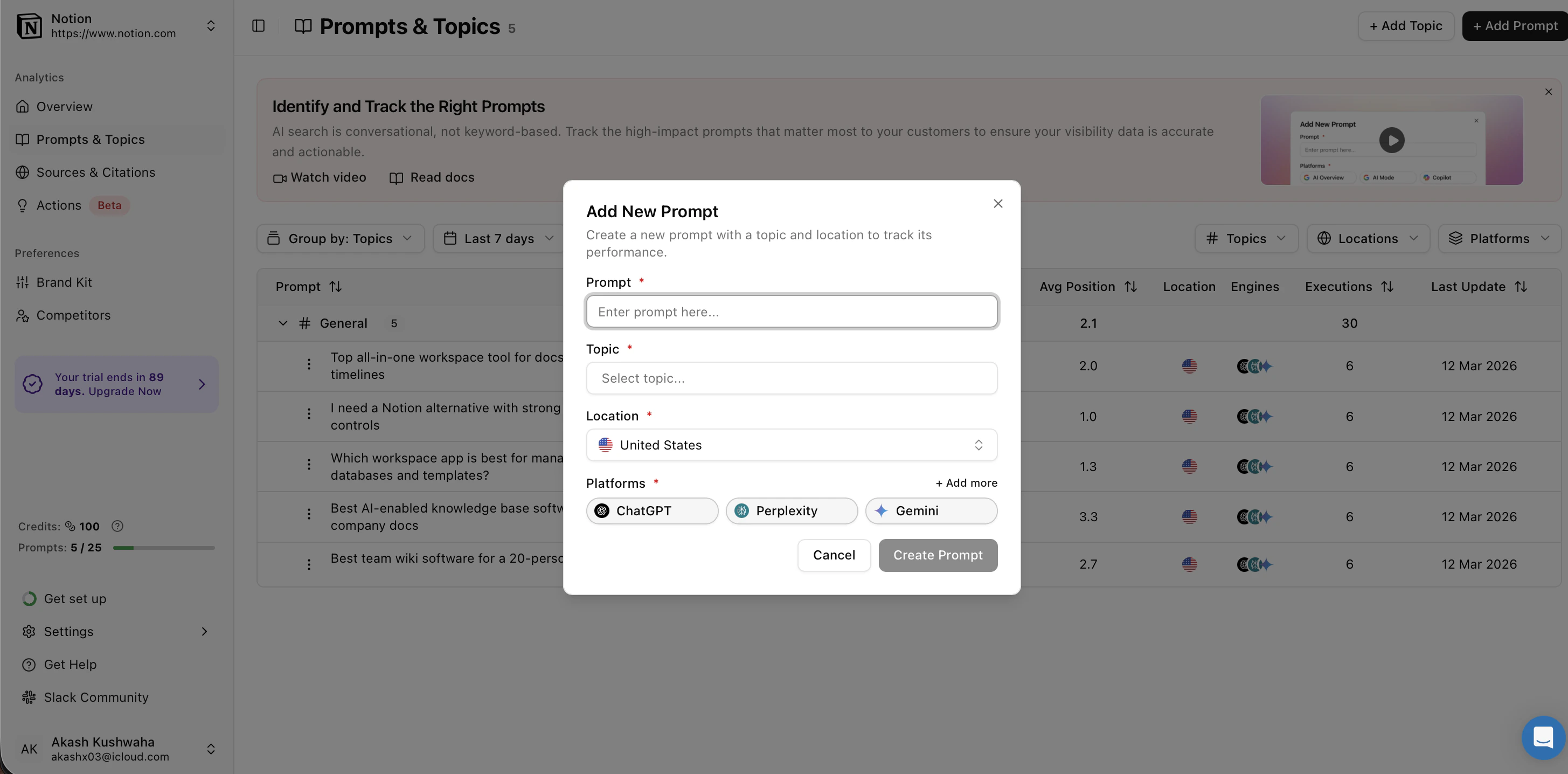
Step 1: Create Your Topics (Folders)
Before adding questions, create folders based on the categories above so you can easily filter “Competitor” data separately from “Brand” data.- Go to the Prompts & Topics page.
- Click + Add Topic.
- Name it clearly (e.g.,
Brand Reputation,Competitors,orDiscovery). - Click Create Topic.
Step 2: Add the Prompt
- Click + Add Prompt.
- Prompt Field: Type the full, conversational question (e.g., “What are the best alternatives to HubSpot?”).
- Topic: Select the folder you just created.
- Location: This is critical. Select the country where your customers are located (e.g., USA or India).
- Why this matters: An AI in India might give a completely different answer than an AI in the USA due to regional data regulations and local preferences.
- Click Create Prompt.
Step 3: Review & Refine
After 24 hours, check your Visibility Score. ( we’d recommend to wait till 7 days to see actual trend & detailed data )- If your score is 0%, it means the AI doesn’t know you exist for that question yet. This is an opportunity to improve your website content.
- If your score is 100%, great job! You are the primary recommendation.