
Accessing the Competitor Dashboard
Navigate to the Competitors tab in the main sidebar. This screen displays a list of brands relevant to your industry, automatically sorted by their current performance metrics.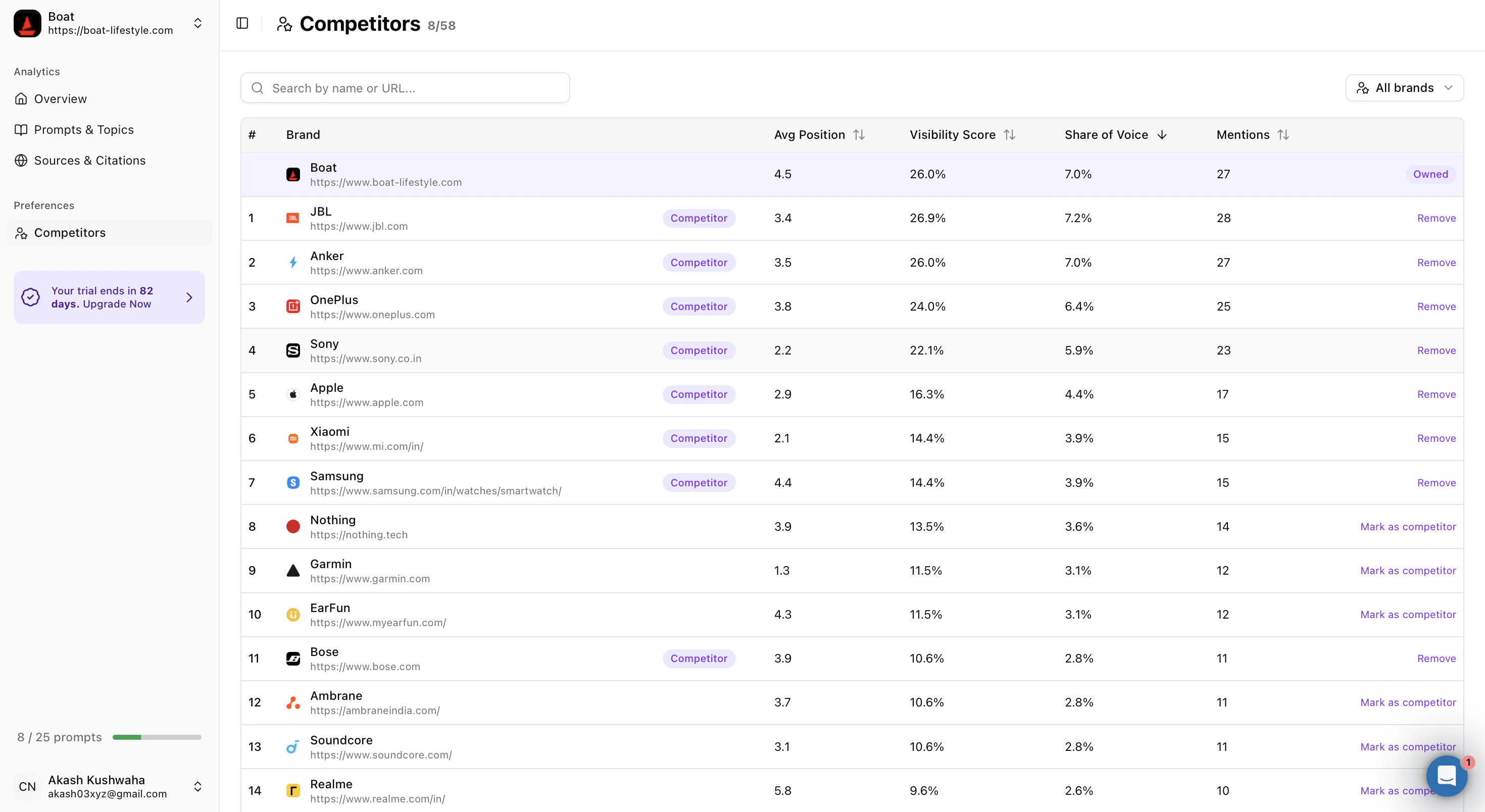
How to Add a Competitor
You can add competitors from the suggested list or search for specific companies manually.- Using the Suggested List
- Scan the list for known rivals.
- To track a brand, click the Mark as competitor button on the far right of the row.
- Once clicked, it’ll give a purple Competitor badge. This confirms the brand is now being tracked in your reports.
- Searching by Name or URL
- Use the search bar at the top labeled “Search by name or URL…”
- Type the brand name or their website domain.
- Click Mark as competitor next to the correct result to add them to your watchlist.
Understanding Competitor Metrics
The Competitors table provides four key data points to help you evaluate the strength of a rival. Here is what each column means:- Avg Position: The average rank where this brand appears in AI-generated lists or answers. A lower number is better (e.g., a position of 1.0 means they are often the first recommendation).
- Visibility Score: A percentage that represents how likely this brand is to be cited or recommended by AI engines for relevant queries. A higher percentage indicates stronger AI presence.
- Share of Voice: The percentage of the total conversation or market space this brand occupies. If a brand has a high Share of Voice, AI engines talk about them more frequently than anyone else.
- Mentions: The raw count of distinct times the brand was cited in the analyzed timeframe.
Managing Your Watchlist
You should only track competitors that directly impact your market share.- To Remove a Competitor: Click the purple Remove button on the far right of the row. It will revert to the Mark as competitor state, and the system will stop using that brand for your comparative benchmarks.
- Recommendation: Focus on 3 to 5 direct competitors. Tracking too many brands can dilute your data and make it harder to identify actionable trends.