> ## Documentation Index
> Fetch the complete documentation index at: https://docs.amadora.ai/llms.txt
> Use this file to discover all available pages before exploring further.
# Understanding Sources & Citations
> Identify which websites AI models use as sources when answering questions about your brand.
This guide explains how to navigate the **Sources & Citations** dashboard in Amadora AI. This page is your command center for understanding exactly where AI models are finding information about your brand and products.
When an AI chatbot answers a user's question, it constructs that answer using data from various websites. This dashboard identifies those websites, categorizes them, and measures how often they are used to generate answers about you.
## Visualizing Your Data
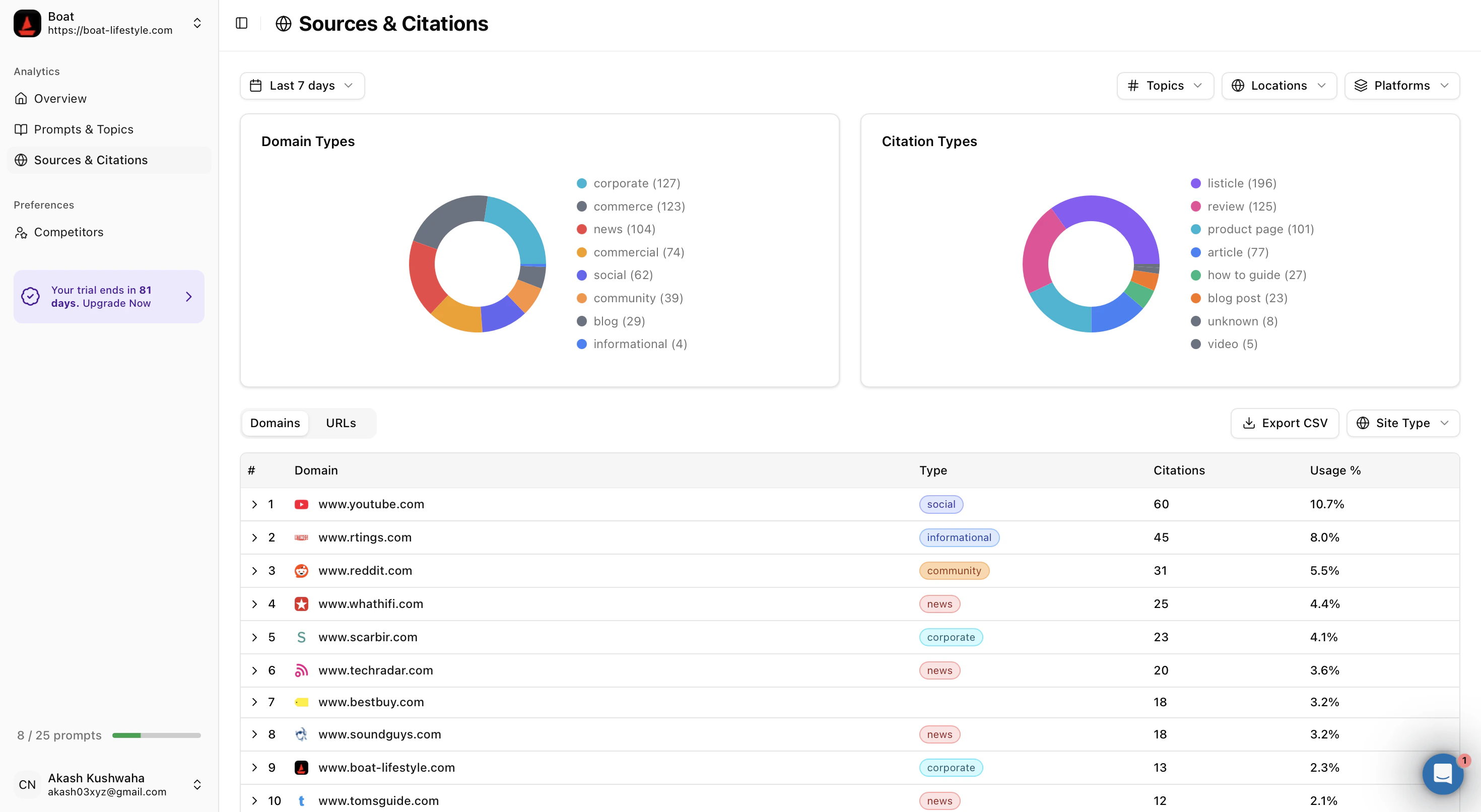
At the top of the page, you will see two charts that give you an instant snapshot of your media landscape.
### Domain Types
The "Domain Types" chart categorizes the *kinds* of websites referencing you.
* This visual breakdown helps you spot high-level patterns in your coverage.
* You can instantly see if your brand is being discussed primarily on social platforms, news outlets, technical documentation sites, or competitor blogs.
* Hover over any section of the chart to see the exact percentage contribution from that category.
### Citation Types
The "Citation Types" chart breaks down the *format* of the content where you appear.
* This distinguishes between different styles of information, such as product reviews, "best of" lists, educational guides, or forum discussions.
* Understanding these formats helps you tailor your content strategy. For example, if you see a high volume of "Reviews," you might focus on reputation management. If you see many "Listicles," you might focus on competitive positioning.
## Digging Deeper: Domains and URLs
Below the charts, you can toggle between two detailed views to explore your data.
### The Domains Tab
This view shows the "big picture." It lists the root websites where your brand appears.
* **Usage %:** Shows how heavily AI models rely on this specific domain for information about you.
* **Type Labels:** We automatically tag each domain with a category so you can quickly scan the list and understand the nature of the source.
### The URLs Tab
This view offers granular precision. Instead of just seeing the website name, you will see the exact thread or page link.
* You can see specific article titles and direct links to the content.
* This is useful for identifying high-value articles that you may want to amplify or finding specific discussions that need your attention.
### Filters
You can refine all data on this page using the filters at the top right:
* **Time:** View data for the last 7 days or custom ranges.
* **Topics:** Filter by specific themes relevant to your product.
* **Locations:** See data specific to regions (e.g., US vs. Europe).
## Key Metrics
We provide two primary metrics to measure your success. These are displayed as trend lines so you can track growth over time.
### Citation Share
**Definition:** This percentage represents your "share of voice." It calculates what percentage of all AI-generated answers in your industry cite your website as a source.
* *Why it matters:* A higher percentage means you are becoming a dominant authority in your market.
### Citation Count
**Definition:** This is the raw number of times your website was cited in AI-generated answers during the selected period.
* *Why it matters:* This measures volume. Even if your percentage share is steady, a rising count means the total conversation around your topic is growing.
## Owned Citations
At the bottom of the dashboard, you will find the **Owned Citations** section.
While the rest of the dashboard shows *external* mentions (what others say about you), this section tracks *your* direct contribution.
* It lists the specific pages from your own website (e.g., your blog posts, documentation, or landing pages) that AI models are using as facts.
* Use this to verify that AI models are reading your official documentation and latest product updates correctly.
 ### Domain Types
The "Domain Types" chart categorizes the *kinds* of websites referencing you.
* This visual breakdown helps you spot high-level patterns in your coverage.
* You can instantly see if your brand is being discussed primarily on social platforms, news outlets, technical documentation sites, or competitor blogs.
* Hover over any section of the chart to see the exact percentage contribution from that category.
### Citation Types
The "Citation Types" chart breaks down the *format* of the content where you appear.
* This distinguishes between different styles of information, such as product reviews, "best of" lists, educational guides, or forum discussions.
* Understanding these formats helps you tailor your content strategy. For example, if you see a high volume of "Reviews," you might focus on reputation management. If you see many "Listicles," you might focus on competitive positioning.
## Digging Deeper: Domains and URLs
Below the charts, you can toggle between two detailed views to explore your data.
### The Domains Tab
This view shows the "big picture." It lists the root websites where your brand appears.
* **Usage %:** Shows how heavily AI models rely on this specific domain for information about you.
* **Type Labels:** We automatically tag each domain with a category so you can quickly scan the list and understand the nature of the source.
### The URLs Tab
This view offers granular precision. Instead of just seeing the website name, you will see the exact thread or page link.
* You can see specific article titles and direct links to the content.
* This is useful for identifying high-value articles that you may want to amplify or finding specific discussions that need your attention.
### Filters
You can refine all data on this page using the filters at the top right:
* **Time:** View data for the last 7 days or custom ranges.
* **Topics:** Filter by specific themes relevant to your product.
* **Locations:** See data specific to regions (e.g., US vs. Europe).
## Key Metrics
We provide two primary metrics to measure your success. These are displayed as trend lines so you can track growth over time.
### Citation Share
**Definition:** This percentage represents your "share of voice." It calculates what percentage of all AI-generated answers in your industry cite your website as a source.
* *Why it matters:* A higher percentage means you are becoming a dominant authority in your market.
### Citation Count
**Definition:** This is the raw number of times your website was cited in AI-generated answers during the selected period.
* *Why it matters:* This measures volume. Even if your percentage share is steady, a rising count means the total conversation around your topic is growing.
## Owned Citations
At the bottom of the dashboard, you will find the **Owned Citations** section.
While the rest of the dashboard shows *external* mentions (what others say about you), this section tracks *your* direct contribution.
* It lists the specific pages from your own website (e.g., your blog posts, documentation, or landing pages) that AI models are using as facts.
* Use this to verify that AI models are reading your official documentation and latest product updates correctly.
### Domain Types
The "Domain Types" chart categorizes the *kinds* of websites referencing you.
* This visual breakdown helps you spot high-level patterns in your coverage.
* You can instantly see if your brand is being discussed primarily on social platforms, news outlets, technical documentation sites, or competitor blogs.
* Hover over any section of the chart to see the exact percentage contribution from that category.
### Citation Types
The "Citation Types" chart breaks down the *format* of the content where you appear.
* This distinguishes between different styles of information, such as product reviews, "best of" lists, educational guides, or forum discussions.
* Understanding these formats helps you tailor your content strategy. For example, if you see a high volume of "Reviews," you might focus on reputation management. If you see many "Listicles," you might focus on competitive positioning.
## Digging Deeper: Domains and URLs
Below the charts, you can toggle between two detailed views to explore your data.
### The Domains Tab
This view shows the "big picture." It lists the root websites where your brand appears.
* **Usage %:** Shows how heavily AI models rely on this specific domain for information about you.
* **Type Labels:** We automatically tag each domain with a category so you can quickly scan the list and understand the nature of the source.
### The URLs Tab
This view offers granular precision. Instead of just seeing the website name, you will see the exact thread or page link.
* You can see specific article titles and direct links to the content.
* This is useful for identifying high-value articles that you may want to amplify or finding specific discussions that need your attention.
### Filters
You can refine all data on this page using the filters at the top right:
* **Time:** View data for the last 7 days or custom ranges.
* **Topics:** Filter by specific themes relevant to your product.
* **Locations:** See data specific to regions (e.g., US vs. Europe).
## Key Metrics
We provide two primary metrics to measure your success. These are displayed as trend lines so you can track growth over time.
### Citation Share
**Definition:** This percentage represents your "share of voice." It calculates what percentage of all AI-generated answers in your industry cite your website as a source.
* *Why it matters:* A higher percentage means you are becoming a dominant authority in your market.
### Citation Count
**Definition:** This is the raw number of times your website was cited in AI-generated answers during the selected period.
* *Why it matters:* This measures volume. Even if your percentage share is steady, a rising count means the total conversation around your topic is growing.
## Owned Citations
At the bottom of the dashboard, you will find the **Owned Citations** section.
While the rest of the dashboard shows *external* mentions (what others say about you), this section tracks *your* direct contribution.
* It lists the specific pages from your own website (e.g., your blog posts, documentation, or landing pages) that AI models are using as facts.
* Use this to verify that AI models are reading your official documentation and latest product updates correctly.