> ## Documentation Index
> Fetch the complete documentation index at: https://docs.amadora.ai/llms.txt
> Use this file to discover all available pages before exploring further.
# Generating AI Optimization Plans
> Generate a step-by-step action plan to get recommended by AI models.
Amadora AI takes the "black box" out of AI search. Instead of guessing what Large Language Models (LLMs) want, our engine reverse-engineers their replies to show you the exact criteria they use to evaluate and recommend brands.
Every recommendation we provide is based on real-time data and the specific requirements of the AI, giving you a clear, step-by-step roadmap to boost your visibility.
## 1. Create Your Optimization Plan
The first step is telling the platform which search query (prompt) you want to rank for.
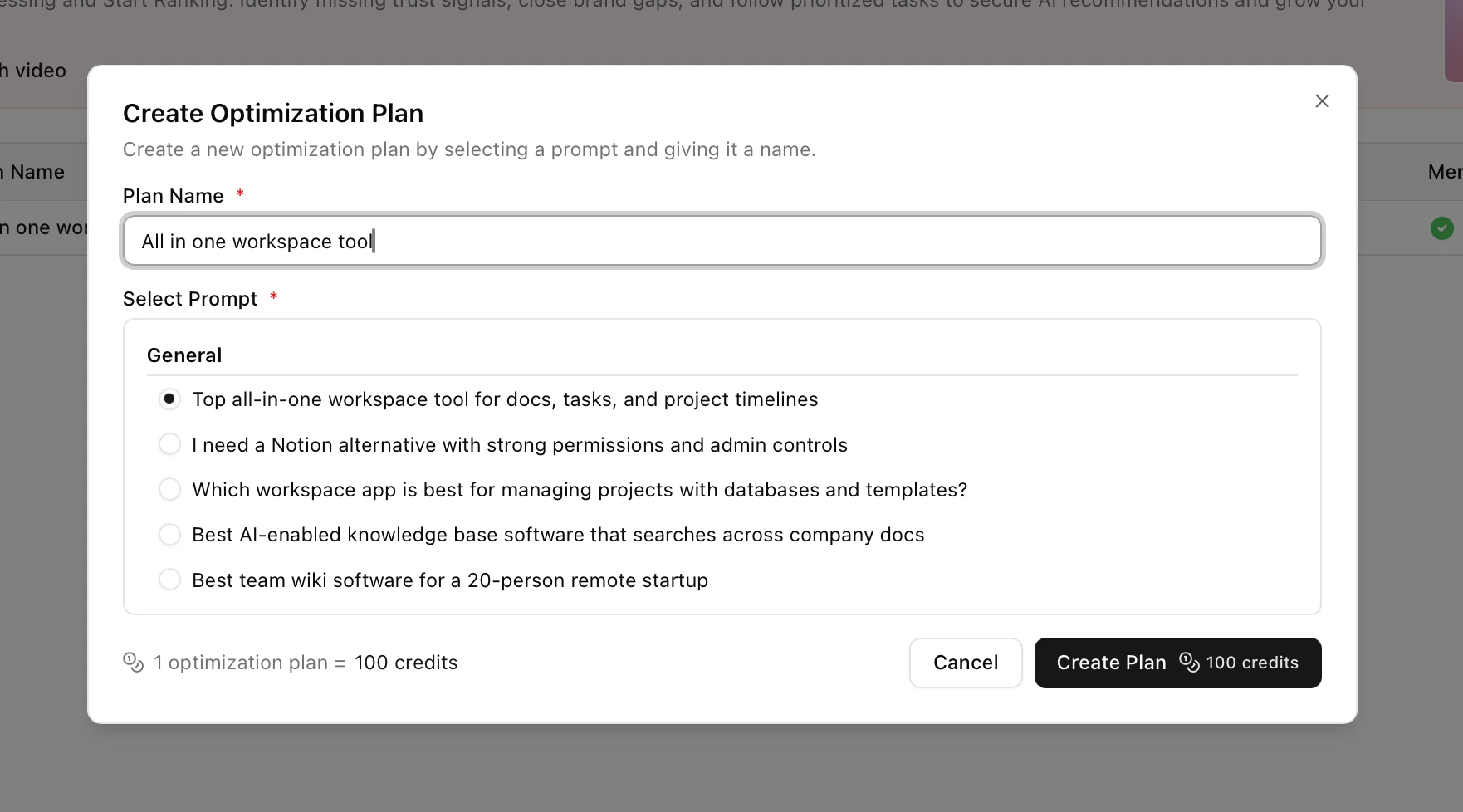
* **Start a New Project:** Navigate to your **Optimization Plans** and click **Create Optimization Plan**.
* **Name and Define:** Give your project a clear name and enter the exact prompt you want to target.
* **Generate:** Once confirmed, Amadora AI takes 5–10 minutes to analyze the prompt and reverse-engineer the AI's decision-making logic.
Creating a new plan costs **100 Amadora Credits**.
**Target "Money Prompts":** Focus on high-intent queries that drive conversions, such as **"Best software for \[Your Core Feature]"**
## 2. Review the AI Evaluation Criteria
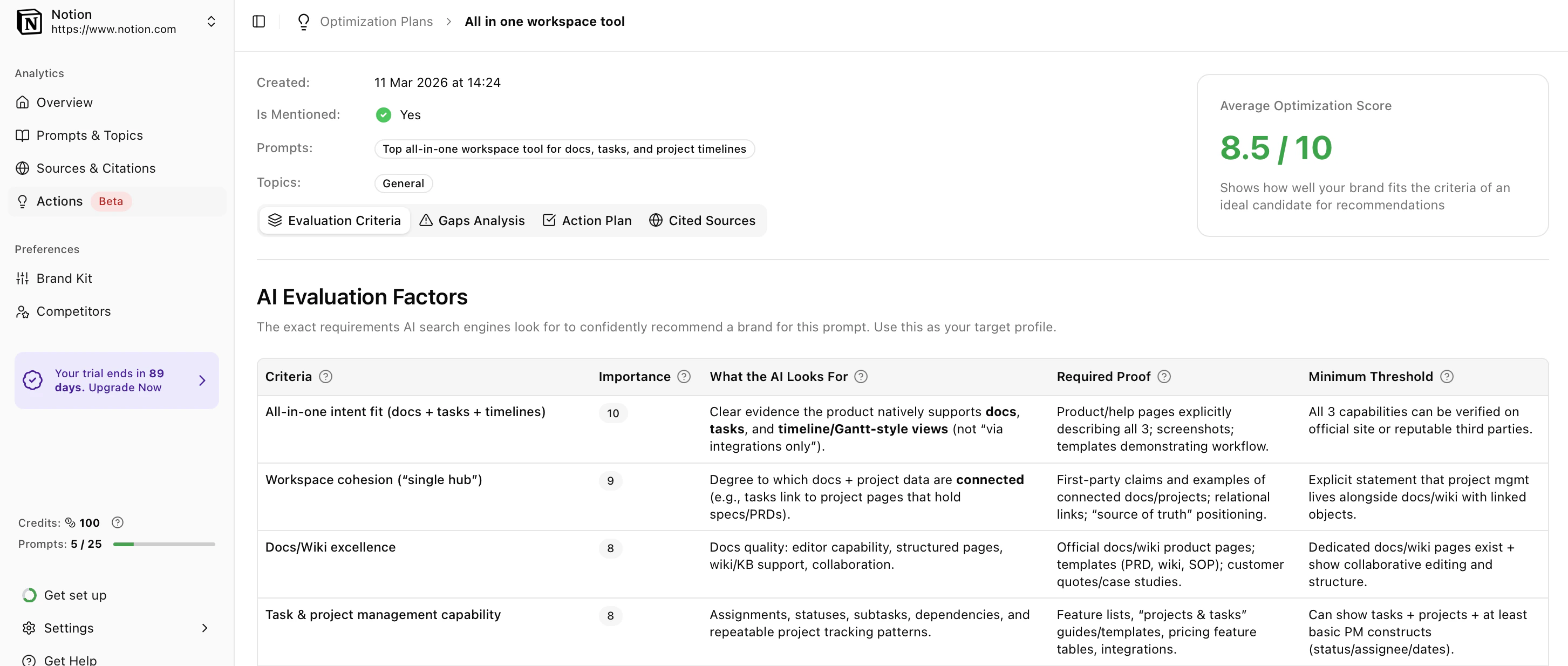
Think of the **Evaluation Criteria** tab as the AI's grading rubric. This shows you exactly what the AI looks for when deciding if a brand is a good fit for the prompt.
* **Importance Score:** See how heavily the AI weighs each factor (scored 1 to 10).
* **What the AI Looks For:** Understand the specific features, workflows, or documentation the AI is trying to verify.
* **Required Proof & Thresholds:** Discover exactly what evidence you need (e.g., *dedicated feature pages, verified G2 reviews*) and the minimum amount required for the AI to trust you.
**Meet the Minimums:** If you don't meet the minimum threshold of proof, the AI's probability of recommending you drops to near zero—no matter how high your traditional SEO authority is.
## 3. Check Your Brand Gap Analysis
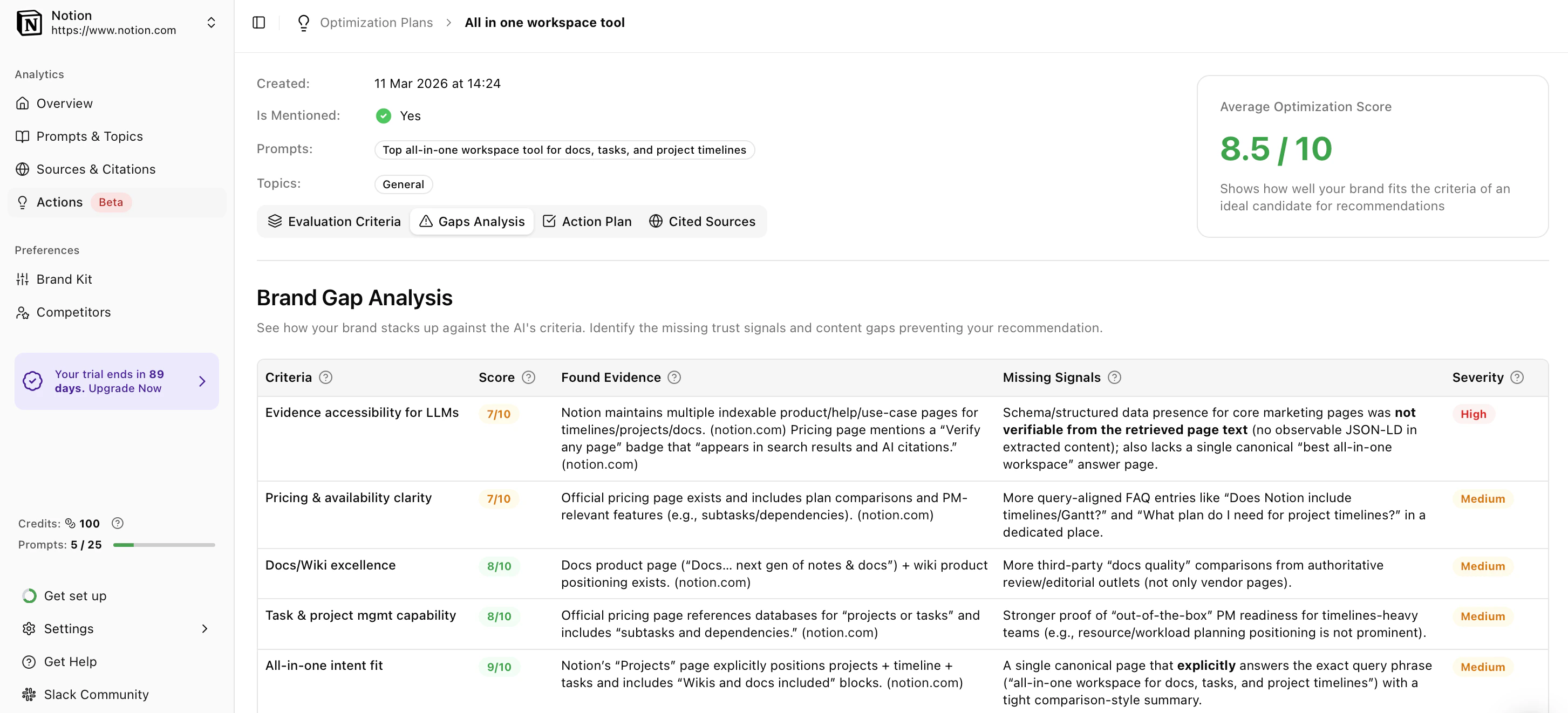
The **Gap Analysis** tab compares your brand's current online presence against the AI's grading rubric. It highlights exactly what is stopping you from being recommended.
* **Review Your Scores:** Each criteria is graded out of 10.
* **Spot the Missing Signals:** The *Found Evidence* column shows what the AI successfully found about you. The *Missing Signals* column shows what the AI couldn't find.
* **Fix the Blockers:** Pay special attention to the **Top Gaps Blocking Recommendations**. These are high-severity issues (like missing schema markup or a lack of clear feature pages) that act as "trust-killers" for the AI.
## 4. Execute the Action Plan
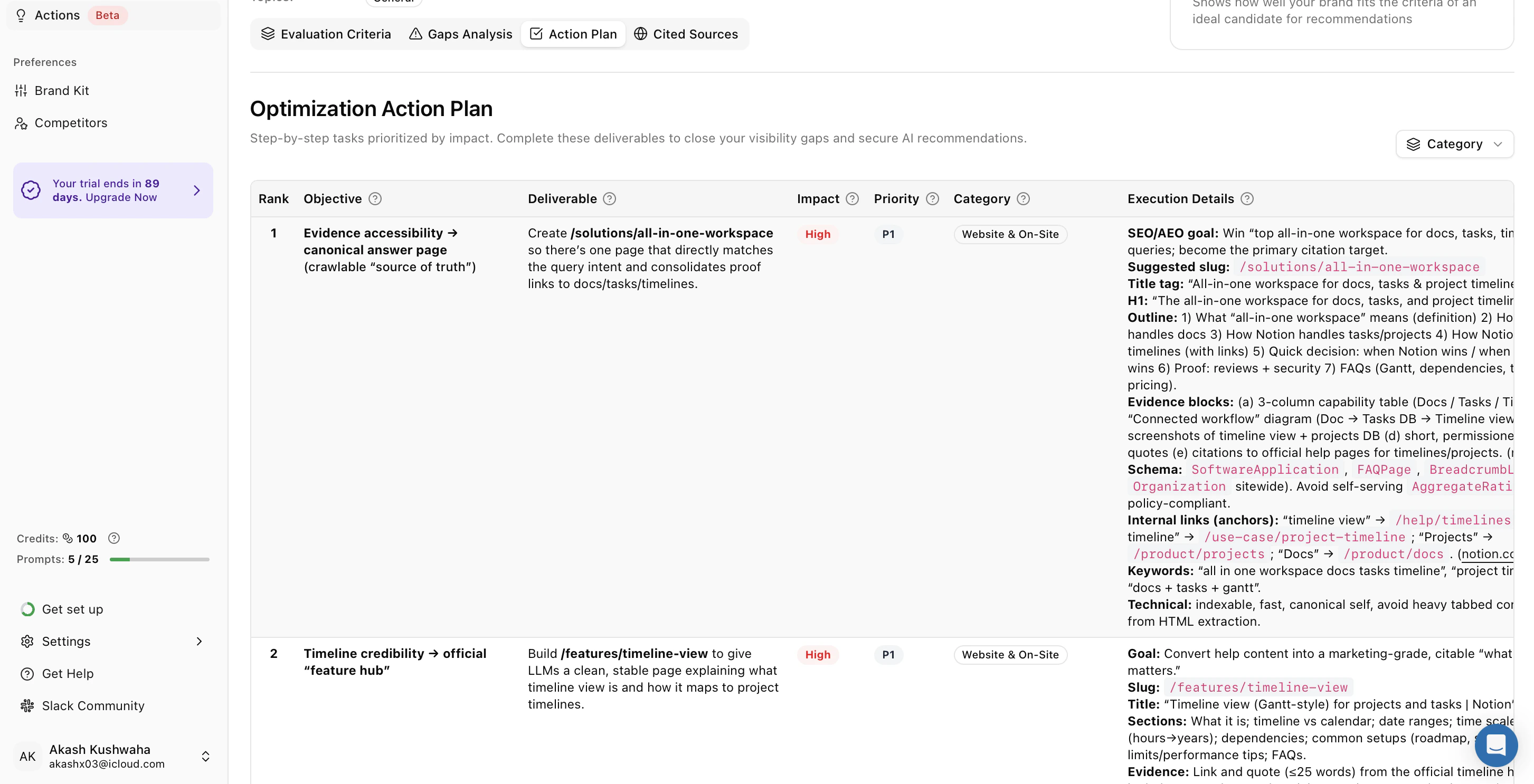
The **Action Plan** tab turns your gaps into a prioritized to-do list for your team. This is your blueprint for optimization.
* **Tackle High Priorities First:** Start with the **P1 (Priority 1)** tasks. These have the highest impact on your visibility.
* **Use the Execution Details:** Click into any task to see exactly how to complete it. You'll get specific deliverables, including suggested page titles, URL slugs, H1s, required Schema types (like `SoftwareApplication`), and the exact evidence blocks you need to build.
## 5. Build Authority with Cited Sources
AI search engines don't just scan your website; they rely on third-party sources they trust. The **Cited Sources** tab shows you exactly where the AI is getting its information for your target prompt.
* **View Top Domains & URLs:** See the exact websites and specific pages the AI relies on most, including their citation usage percentages.
* **Target Your PR Efforts:** If your brand isn't mentioned on these top-cited domains (like specific review sites, niche blogs, or industry directories), those sites should become your #1 target for outreach, PR, and community building.
In AI Search, a mention on a highly-cited niche website is often much more valuable than a standard backlink from a high-DR site that the AI doesn't actually read.
 * **Start a New Project:** Navigate to your **Optimization Plans** and click **Create Optimization Plan**.
* **Name and Define:** Give your project a clear name and enter the exact prompt you want to target.
* **Generate:** Once confirmed, Amadora AI takes 5–10 minutes to analyze the prompt and reverse-engineer the AI's decision-making logic.
* **Start a New Project:** Navigate to your **Optimization Plans** and click **Create Optimization Plan**.
* **Name and Define:** Give your project a clear name and enter the exact prompt you want to target.
* **Generate:** Once confirmed, Amadora AI takes 5–10 minutes to analyze the prompt and reverse-engineer the AI's decision-making logic.
 * **Importance Score:** See how heavily the AI weighs each factor (scored 1 to 10).
* **What the AI Looks For:** Understand the specific features, workflows, or documentation the AI is trying to verify.
* **Required Proof & Thresholds:** Discover exactly what evidence you need (e.g., *dedicated feature pages, verified G2 reviews*) and the minimum amount required for the AI to trust you.
* **Importance Score:** See how heavily the AI weighs each factor (scored 1 to 10).
* **What the AI Looks For:** Understand the specific features, workflows, or documentation the AI is trying to verify.
* **Required Proof & Thresholds:** Discover exactly what evidence you need (e.g., *dedicated feature pages, verified G2 reviews*) and the minimum amount required for the AI to trust you.
 * **Review Your Scores:** Each criteria is graded out of 10.
* **Spot the Missing Signals:** The *Found Evidence* column shows what the AI successfully found about you. The *Missing Signals* column shows what the AI couldn't find.
* **Fix the Blockers:** Pay special attention to the **Top Gaps Blocking Recommendations**. These are high-severity issues (like missing schema markup or a lack of clear feature pages) that act as "trust-killers" for the AI.
## 4. Execute the Action Plan
The **Action Plan** tab turns your gaps into a prioritized to-do list for your team. This is your blueprint for optimization.
* **Review Your Scores:** Each criteria is graded out of 10.
* **Spot the Missing Signals:** The *Found Evidence* column shows what the AI successfully found about you. The *Missing Signals* column shows what the AI couldn't find.
* **Fix the Blockers:** Pay special attention to the **Top Gaps Blocking Recommendations**. These are high-severity issues (like missing schema markup or a lack of clear feature pages) that act as "trust-killers" for the AI.
## 4. Execute the Action Plan
The **Action Plan** tab turns your gaps into a prioritized to-do list for your team. This is your blueprint for optimization.
 * **Tackle High Priorities First:** Start with the **P1 (Priority 1)** tasks. These have the highest impact on your visibility.
* **Use the Execution Details:** Click into any task to see exactly how to complete it. You'll get specific deliverables, including suggested page titles, URL slugs, H1s, required Schema types (like `SoftwareApplication`), and the exact evidence blocks you need to build.
## 5. Build Authority with Cited Sources
AI search engines don't just scan your website; they rely on third-party sources they trust. The **Cited Sources** tab shows you exactly where the AI is getting its information for your target prompt.
* **Tackle High Priorities First:** Start with the **P1 (Priority 1)** tasks. These have the highest impact on your visibility.
* **Use the Execution Details:** Click into any task to see exactly how to complete it. You'll get specific deliverables, including suggested page titles, URL slugs, H1s, required Schema types (like `SoftwareApplication`), and the exact evidence blocks you need to build.
## 5. Build Authority with Cited Sources
AI search engines don't just scan your website; they rely on third-party sources they trust. The **Cited Sources** tab shows you exactly where the AI is getting its information for your target prompt.
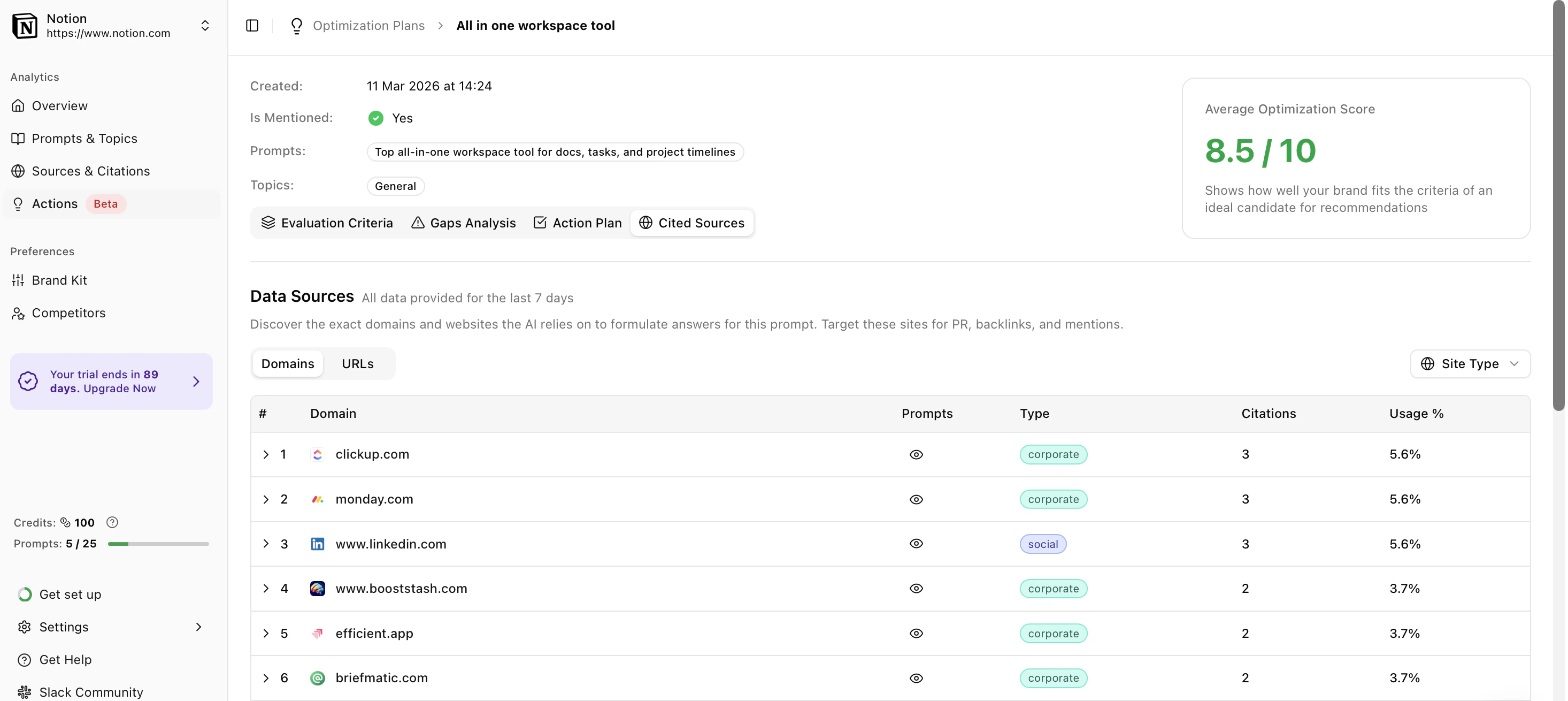 * **View Top Domains & URLs:** See the exact websites and specific pages the AI relies on most, including their citation usage percentages.
* **Target Your PR Efforts:** If your brand isn't mentioned on these top-cited domains (like specific review sites, niche blogs, or industry directories), those sites should become your #1 target for outreach, PR, and community building.
* **View Top Domains & URLs:** See the exact websites and specific pages the AI relies on most, including their citation usage percentages.
* **Target Your PR Efforts:** If your brand isn't mentioned on these top-cited domains (like specific review sites, niche blogs, or industry directories), those sites should become your #1 target for outreach, PR, and community building.