> ## Documentation Index
> Fetch the complete documentation index at: https://docs.amadora.ai/llms.txt
> Use this file to discover all available pages before exploring further.
# Changelog
> Stay up to date with the latest Amadora AI updates, new features, improvements and fixes.
**Amadora AI Agent & GSC Integration**
We’re excited to introduce the **Amadora AI Agent** along with a deep **Google Search Console (GSC)** integration to give you complete visibility across both AI search and traditional organic search.
### The Amadora AI Agent
Powered by **ChatGPT 5.6**, the Agent sits directly on top of your project data to analyze metrics, build deliverables, and answer complex questions without manual exports.
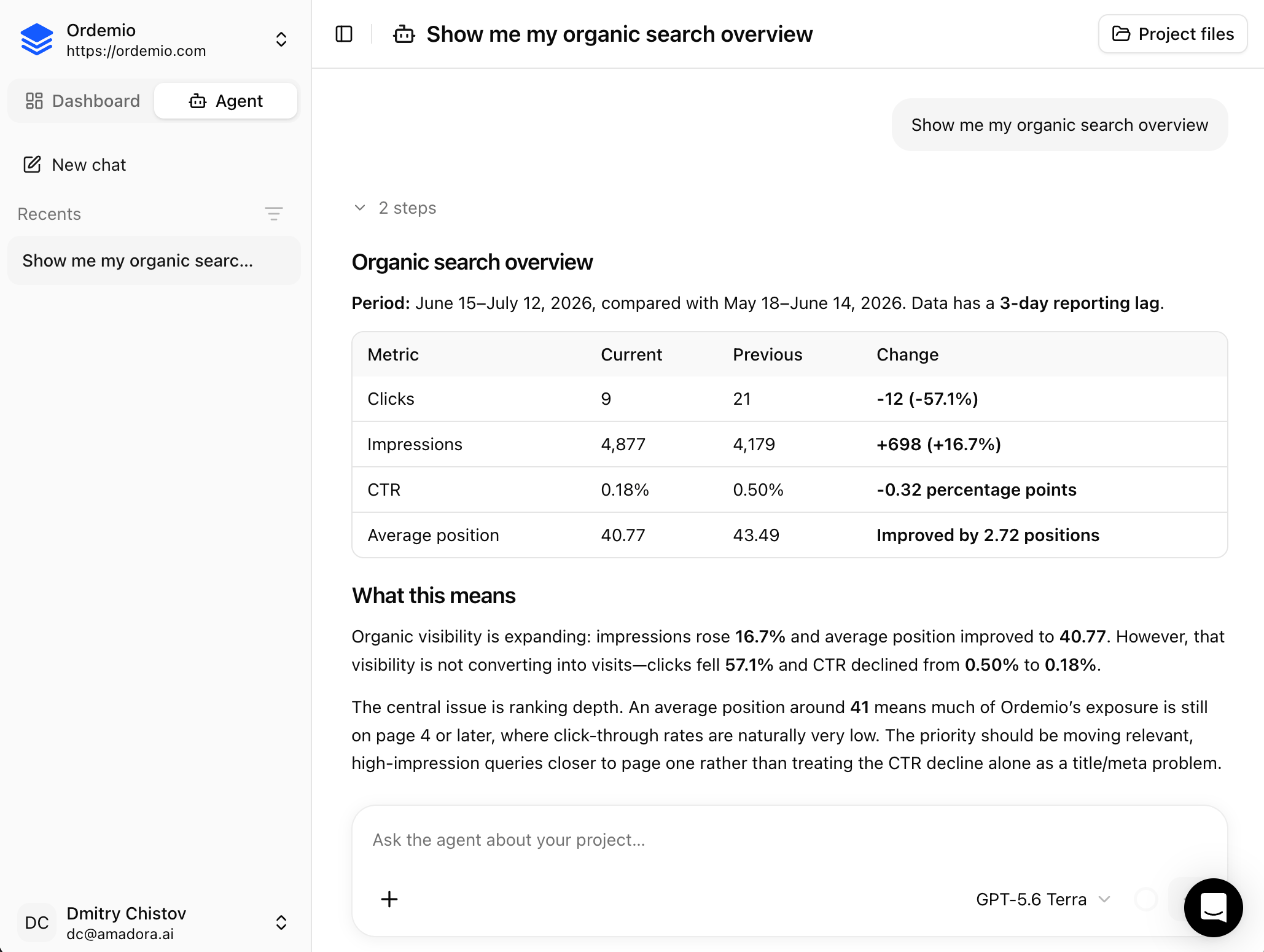 * **Custom Deliverables:** Instantly generate action plans, summarize citations, or pull custom visibility reports.
* **Prompt Management:** Automatically identify topical gaps, generate new prompt sets, and clean up duplicates.
* **Unified Analysis:** Compare AI search visibility directly against organic Google search data.
### Google Search Console (GSC) Integration
Connecting GSC unlocks 7 built-in analysis skills inside the Agent:
* **Performance Overview & Movers:** Track site-wide KPI trends and pinpoint your biggest winning or dropping queries and pages.
* **CTR Opportunities & Cannibalization:** Surface under-clicking pages based on custom expected CTR curves and identify internal keyword conflicts.
* **Entity Details & URL Inspection:** Run granular query/page breakdowns and check live URL indexing status and errors.
* **Full Report:** Generate a complete organic search brief in a single query.
### Getting Started
1. Connect your account in **Brand Settings → Connections** and select your GSC property.
* **Custom Deliverables:** Instantly generate action plans, summarize citations, or pull custom visibility reports.
* **Prompt Management:** Automatically identify topical gaps, generate new prompt sets, and clean up duplicates.
* **Unified Analysis:** Compare AI search visibility directly against organic Google search data.
### Google Search Console (GSC) Integration
Connecting GSC unlocks 7 built-in analysis skills inside the Agent:
* **Performance Overview & Movers:** Track site-wide KPI trends and pinpoint your biggest winning or dropping queries and pages.
* **CTR Opportunities & Cannibalization:** Surface under-clicking pages based on custom expected CTR curves and identify internal keyword conflicts.
* **Entity Details & URL Inspection:** Run granular query/page breakdowns and check live URL indexing status and errors.
* **Full Report:** Generate a complete organic search brief in a single query.
### Getting Started
1. Connect your account in **Brand Settings → Connections** and select your GSC property.
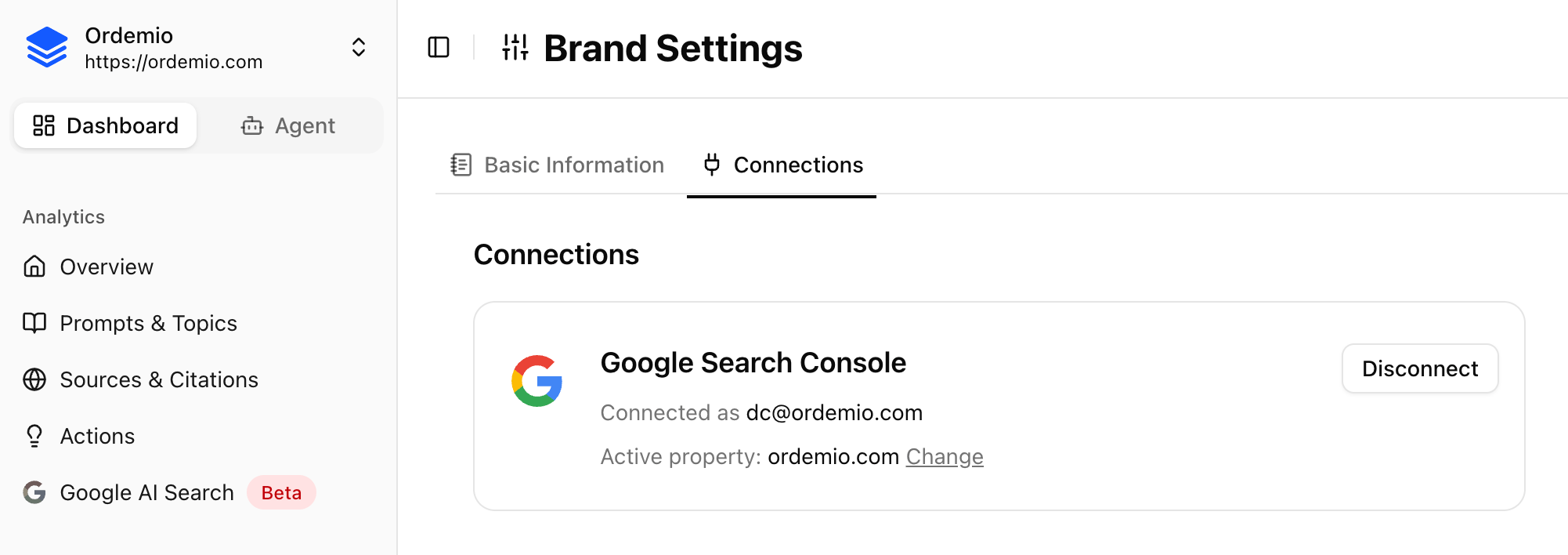 2. Open the **Agent** tab in the top-left corner of your project and ask your first question.
**Google AI Search tracking is live now**
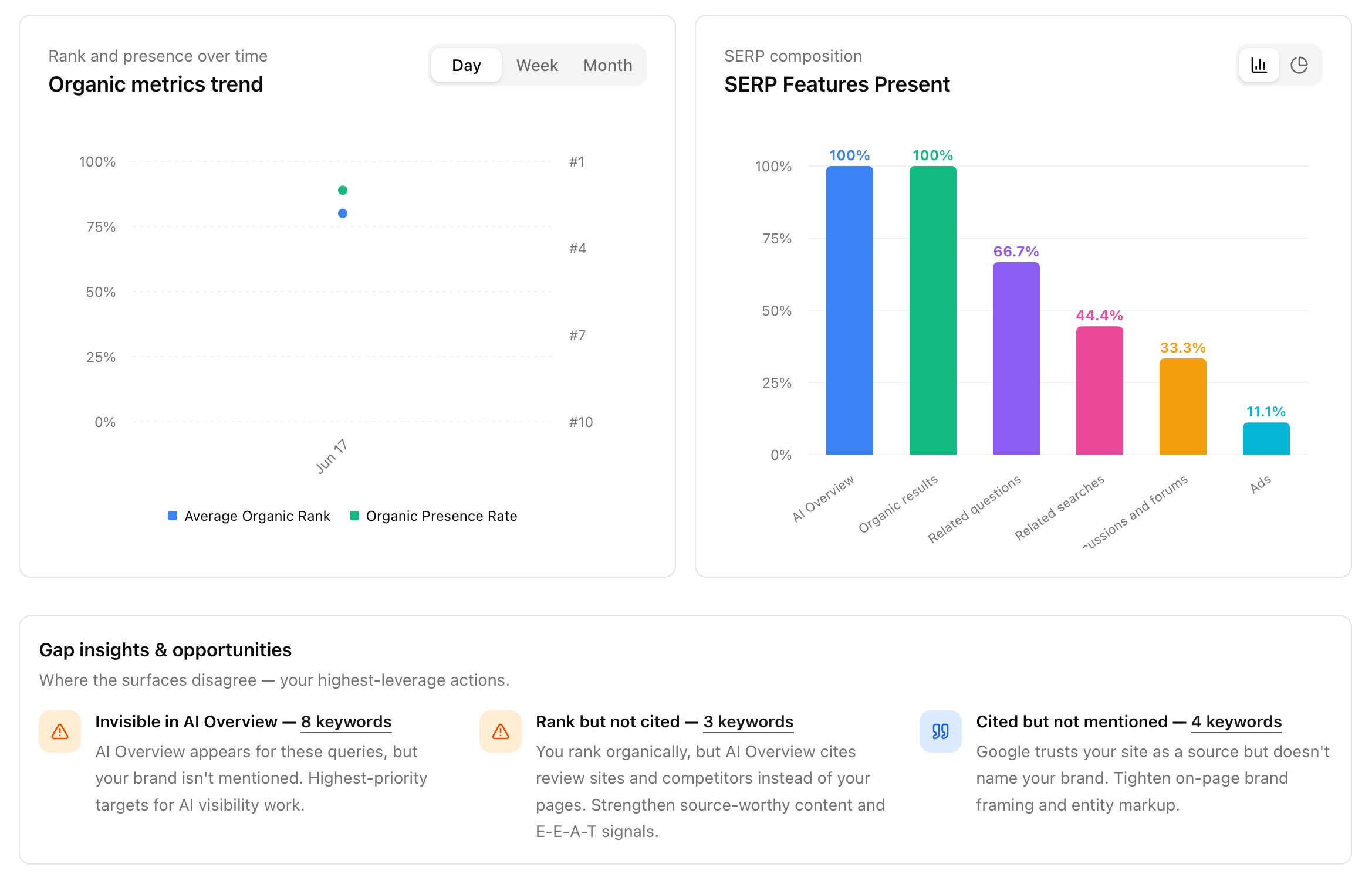
Google doesn't just show blue links anymore. For most searches, an AI Overview now sits right at the top—and that answer decides who gets seen.
you can rank #1 organically and still be completely absent from the AI Overview sitting above you.
To bridge this gap, we've built **Google AI Search**. You can now track both sides of Google in one place, eliminating the need to bolt a second tool onto your existing rank tracker.
### What's included
1. **Unified Tracking:** Monitor your classic rankings (where you sit in the organic top 10) directly alongside your AI Overview visibility.
2. Open the **Agent** tab in the top-left corner of your project and ask your first question.
**Google AI Search tracking is live now**
Google doesn't just show blue links anymore. For most searches, an AI Overview now sits right at the top—and that answer decides who gets seen.
you can rank #1 organically and still be completely absent from the AI Overview sitting above you.
To bridge this gap, we've built **Google AI Search**. You can now track both sides of Google in one place, eliminating the need to bolt a second tool onto your existing rank tracker.
### What's included
1. **Unified Tracking:** Monitor your classic rankings (where you sit in the organic top 10) directly alongside your AI Overview visibility.
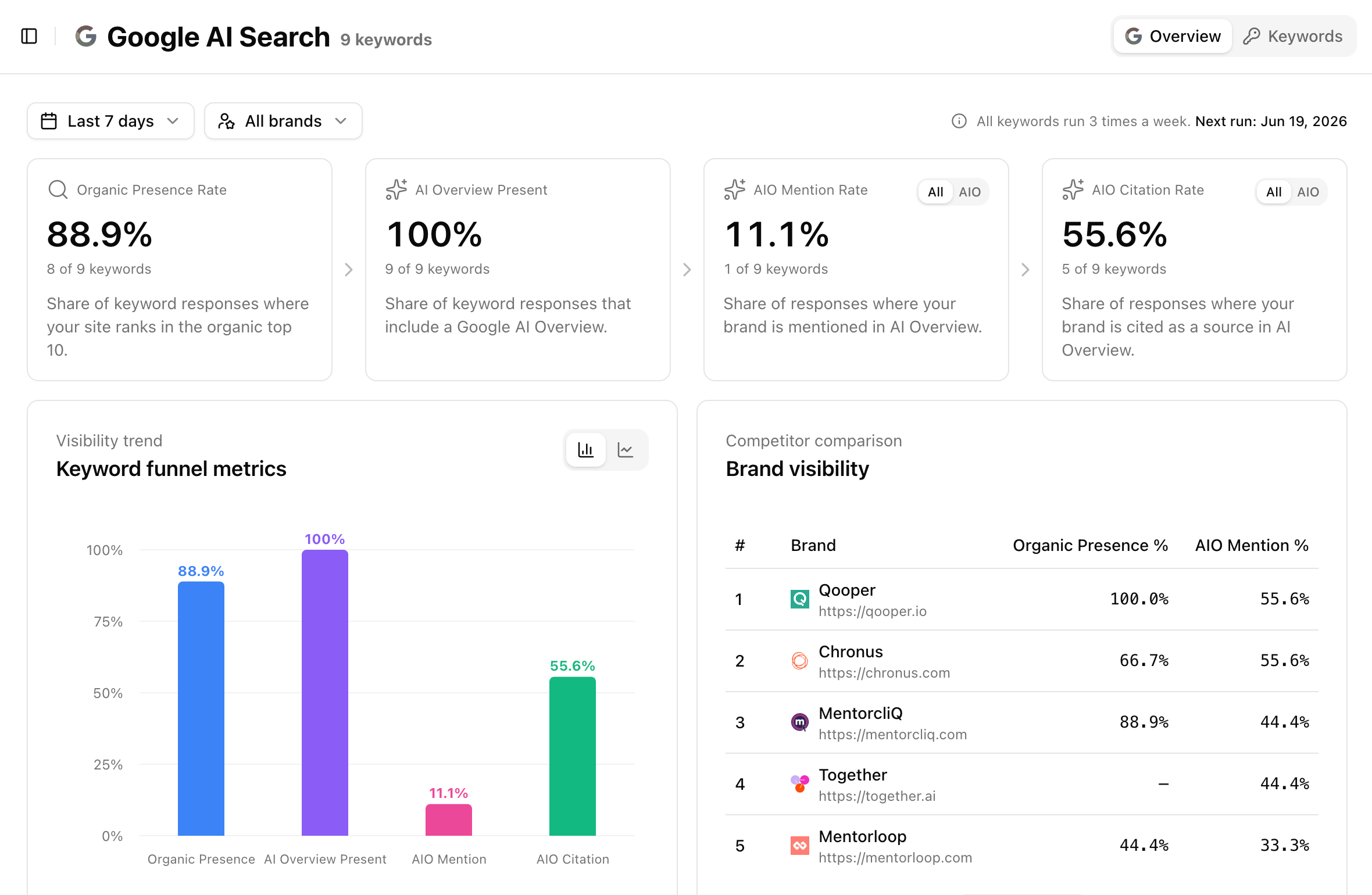 2. **Brand & Citation Monitoring:** See exactly whether Google's AI *mentions* your brand and actually *cites* your site as a source.
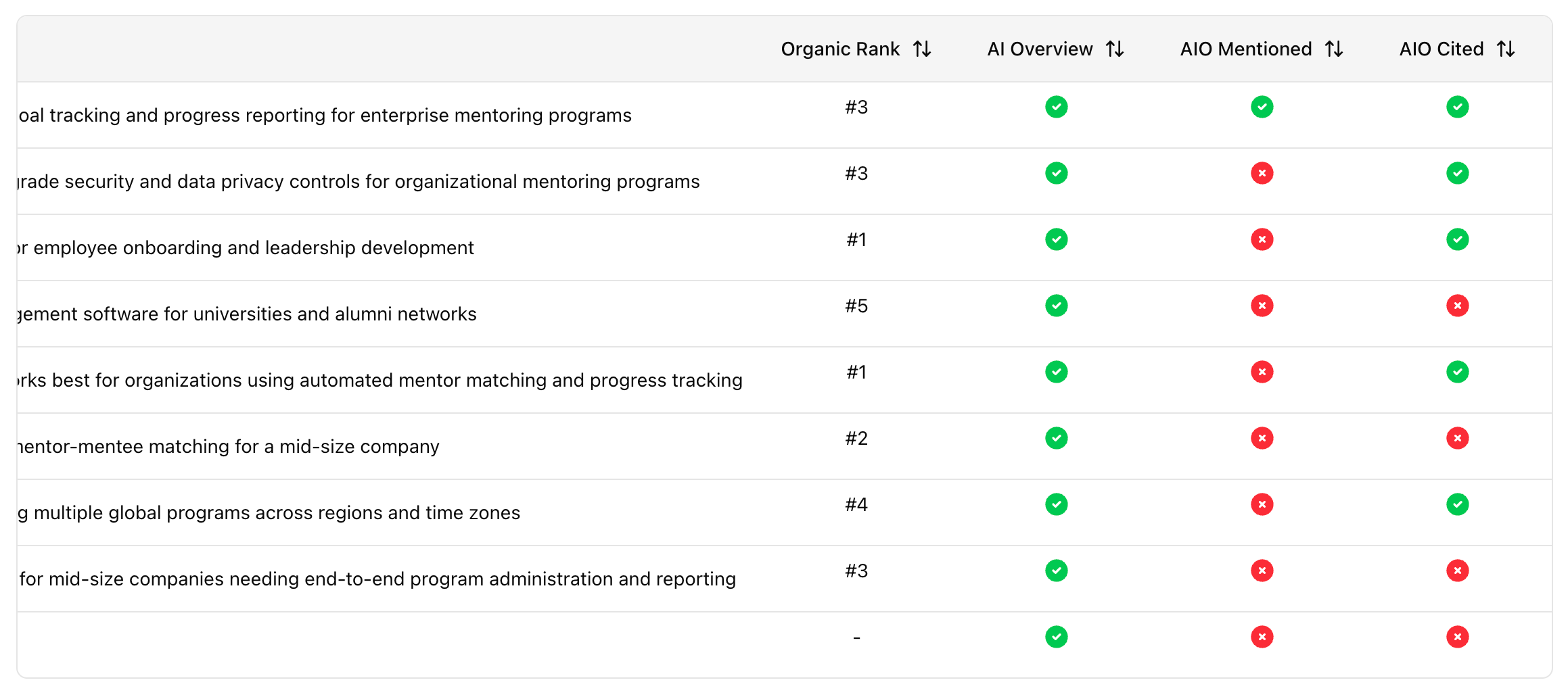 3. **Automated Gap Insights:** Stop guessing. Amadora now highlights your exact missed opportunities, acting as an automated to-do list.
 You can also now connect **Google Search Console** directly in there.
Every account now comes with **5 keywords free**. It takes about two minutes to add your core search terms and see exactly where you stand.
**New: Topical Map**
Finding prompts to track shouldn't be guesswork.
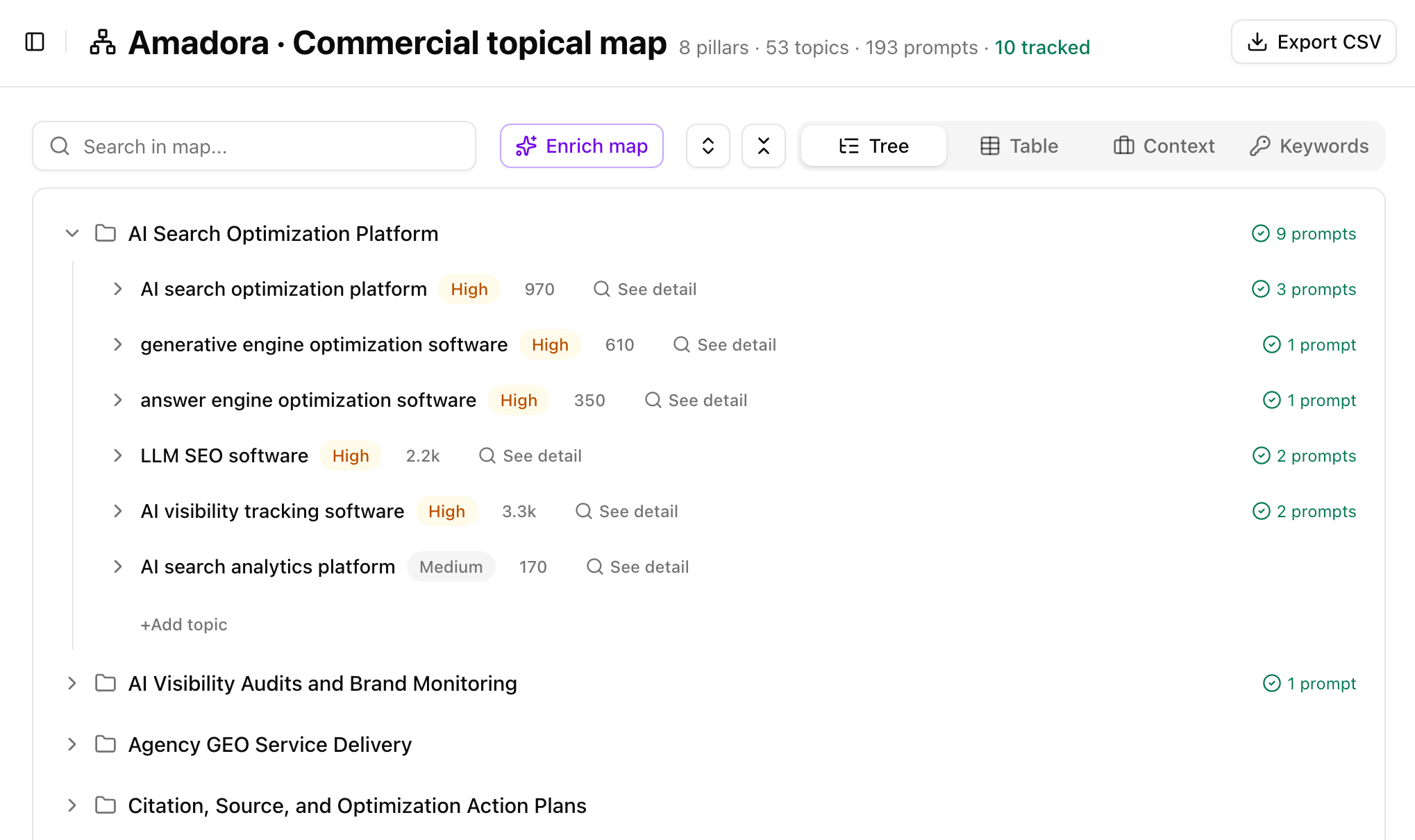
Topical Map helps you discover, validate, and prioritize the topics and prompts that matter most to your business.
Build a structured hierarchy of Pillars → Topics → Prompts, then validate opportunities using Google Search Console data, competitor research, and your own keyword lists.
You can also now connect **Google Search Console** directly in there.
Every account now comes with **5 keywords free**. It takes about two minutes to add your core search terms and see exactly where you stand.
**New: Topical Map**
Finding prompts to track shouldn't be guesswork.
Topical Map helps you discover, validate, and prioritize the topics and prompts that matter most to your business.
Build a structured hierarchy of Pillars → Topics → Prompts, then validate opportunities using Google Search Console data, competitor research, and your own keyword lists.
 ### What's included
* Generate a complete topical map from your business context
* Prioritize topics based on commercial intent
* Validate opportunities with real search demand
* View keyword clusters with search volume, CPC, and difficulty
### What's included
* Generate a complete topical map from your business context
* Prioritize topics based on commercial intent
* Validate opportunities with real search demand
* View keyword clusters with search volume, CPC, and difficulty
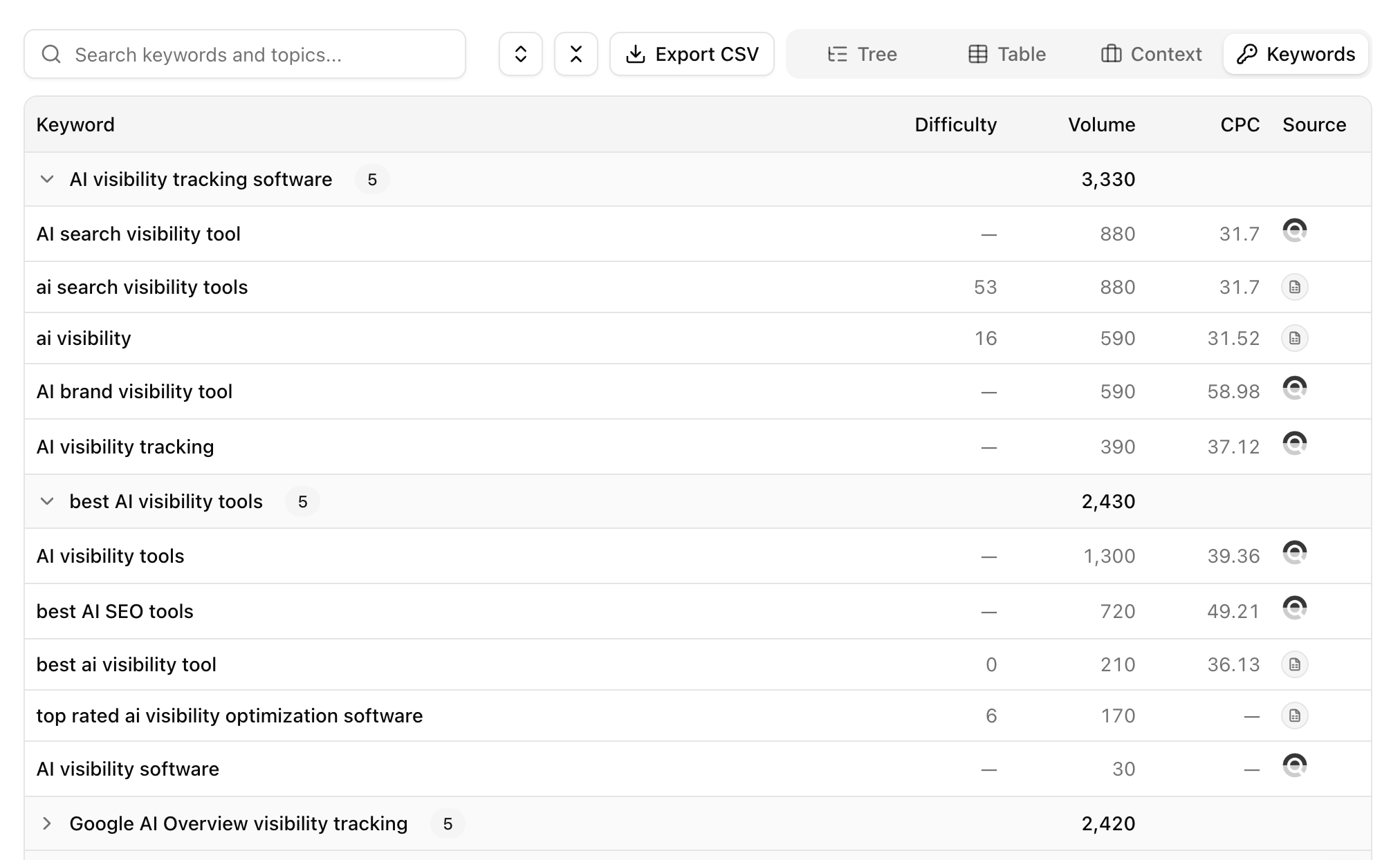 * Explore topic, keyword, and context views
* Export your map as CSV
* Push high-priority prompts directly into tracking
### Why it matters
Most teams start AI Search optimization by brainstorming prompts.
Topical Map helps you focus on prompts backed by buyer intent and search demand, making it easier to identify opportunities that can drive visibility, leads, and revenue.
Available now in all projects under **Topical Map**.
**New: Weekly Report 📊**
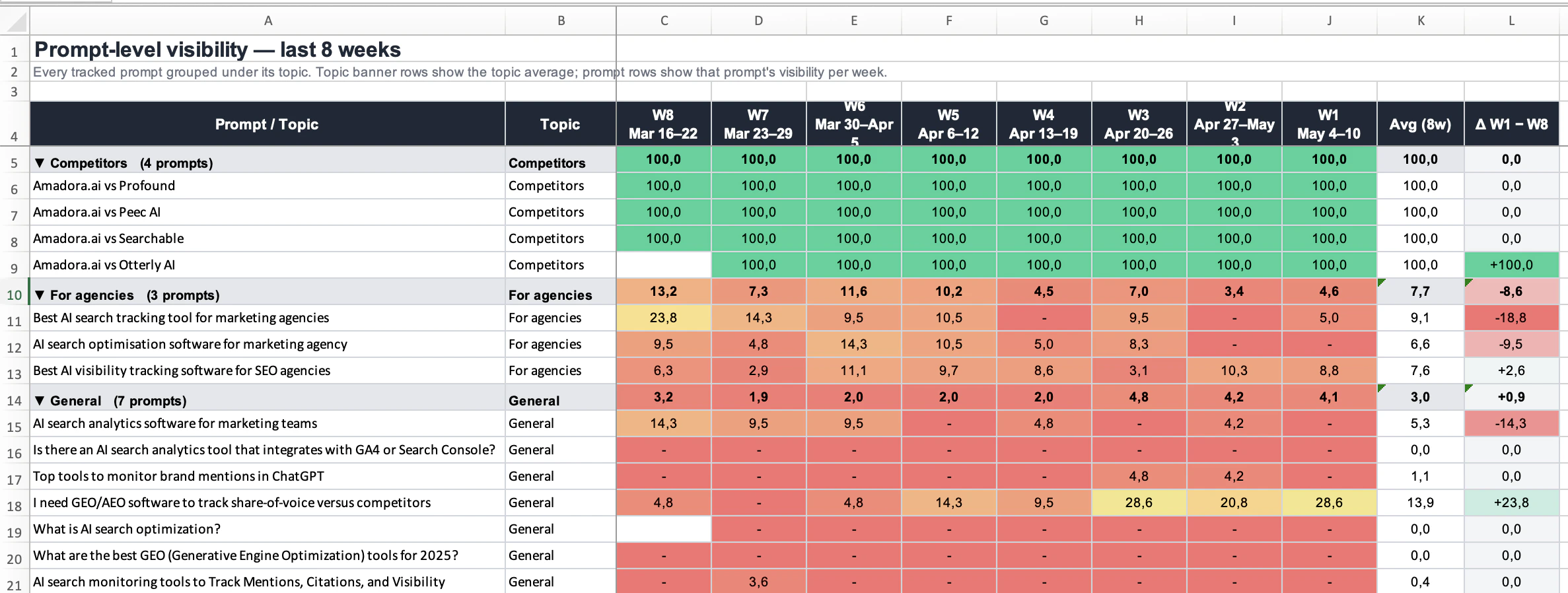
See your AI visibility as a trend, not a snapshot. The Weekly Report lays out every topic and prompt as a week-by-week heatmap — green where you're showing up in AI answers, red where you're not — with a delta column that shows how many points your visibility moved over the period.
* Explore topic, keyword, and context views
* Export your map as CSV
* Push high-priority prompts directly into tracking
### Why it matters
Most teams start AI Search optimization by brainstorming prompts.
Topical Map helps you focus on prompts backed by buyer intent and search demand, making it easier to identify opportunities that can drive visibility, leads, and revenue.
Available now in all projects under **Topical Map**.
**New: Weekly Report 📊**
See your AI visibility as a trend, not a snapshot. The Weekly Report lays out every topic and prompt as a week-by-week heatmap — green where you're showing up in AI answers, red where you're not — with a delta column that shows how many points your visibility moved over the period.
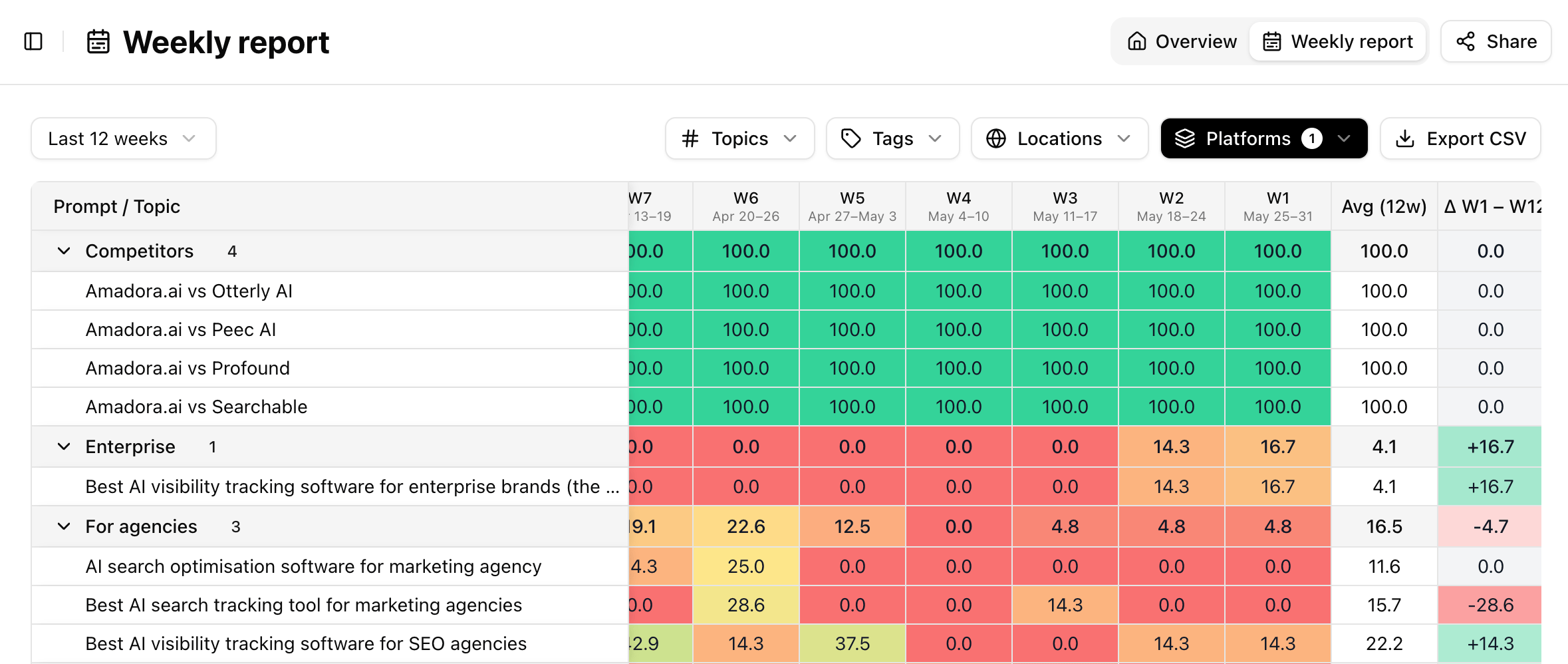 * Choose a 4, 8, 12, or 24-week window
* Filter by topic, tag, location, and platform
* Delta column surfaces your biggest gains and drops at a glance
* Built for proving ROI over time and for client-ready reporting
Available now in your account.
**The Amadora MCP & Plugin for Claude Cowork.**
We’ve officially launched the **Amadora plugin for Claude Cowork**.
Instead of manually scraping data and building reports, you can now generate heavy-hitting AI-search deliverables directly inside your Claude workspace.
Here are the 4 new skills now at your disposal:
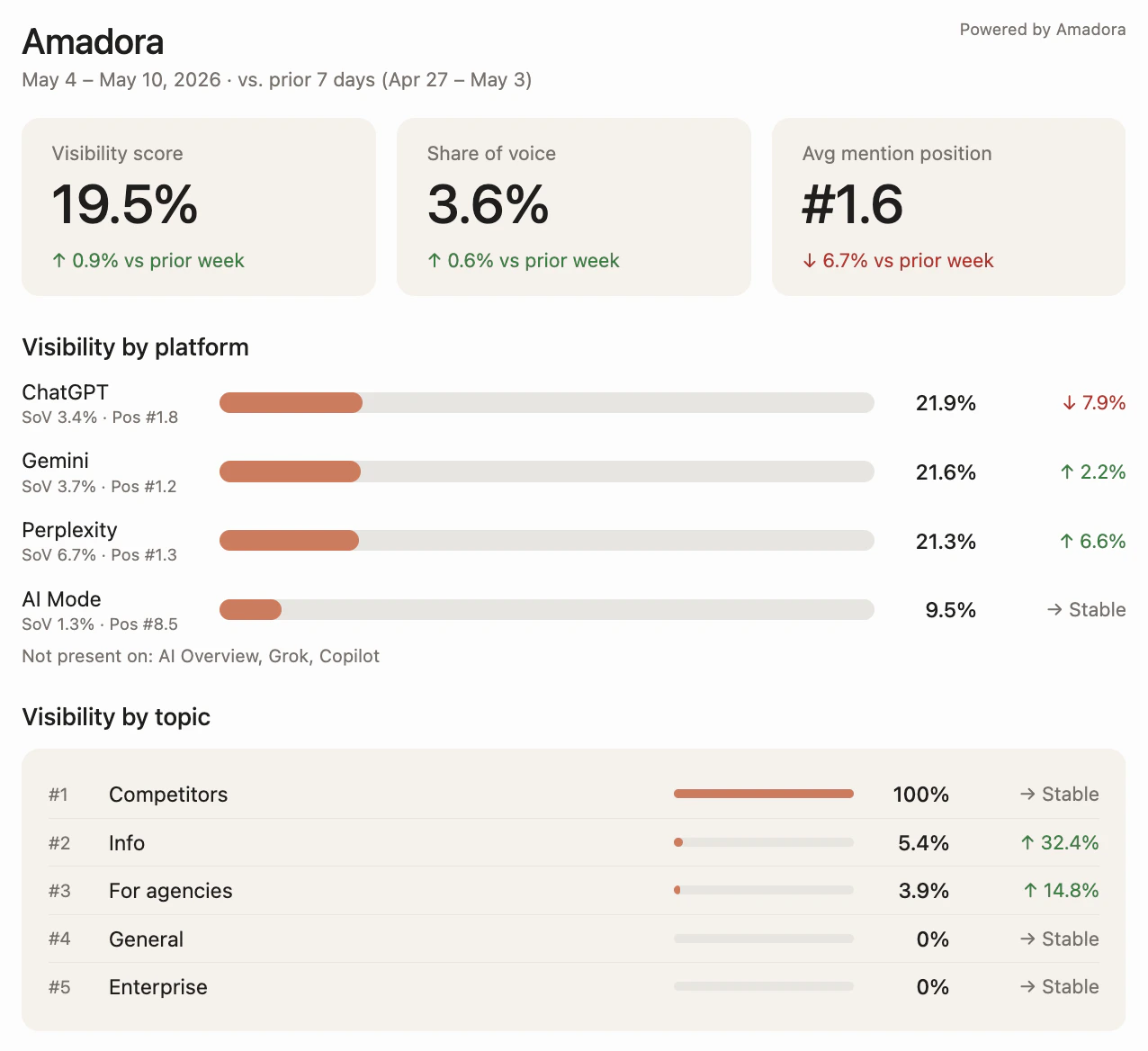
* **Weekly Visibility Snapshots:** Instantly generate styled, in-chat widgets tracking your Share of Voice across ChatGPT, Claude, Perplexity, Gemini, and Google AIO.
* Choose a 4, 8, 12, or 24-week window
* Filter by topic, tag, location, and platform
* Delta column surfaces your biggest gains and drops at a glance
* Built for proving ROI over time and for client-ready reporting
Available now in your account.
**The Amadora MCP & Plugin for Claude Cowork.**
We’ve officially launched the **Amadora plugin for Claude Cowork**.
Instead of manually scraping data and building reports, you can now generate heavy-hitting AI-search deliverables directly inside your Claude workspace.
Here are the 4 new skills now at your disposal:
* **Weekly Visibility Snapshots:** Instantly generate styled, in-chat widgets tracking your Share of Voice across ChatGPT, Claude, Perplexity, Gemini, and Google AIO.
 * **Multi-Week Trend Reports:** Export presentation-ready workbooks with heatmaps (4 to 24 weeks)—perfect for dropping right into client QBRs.
 * **AI-Citation Content Planner:** Let Claude rank your top opportunities and write `.md` briefs based on actual query fan-out data.
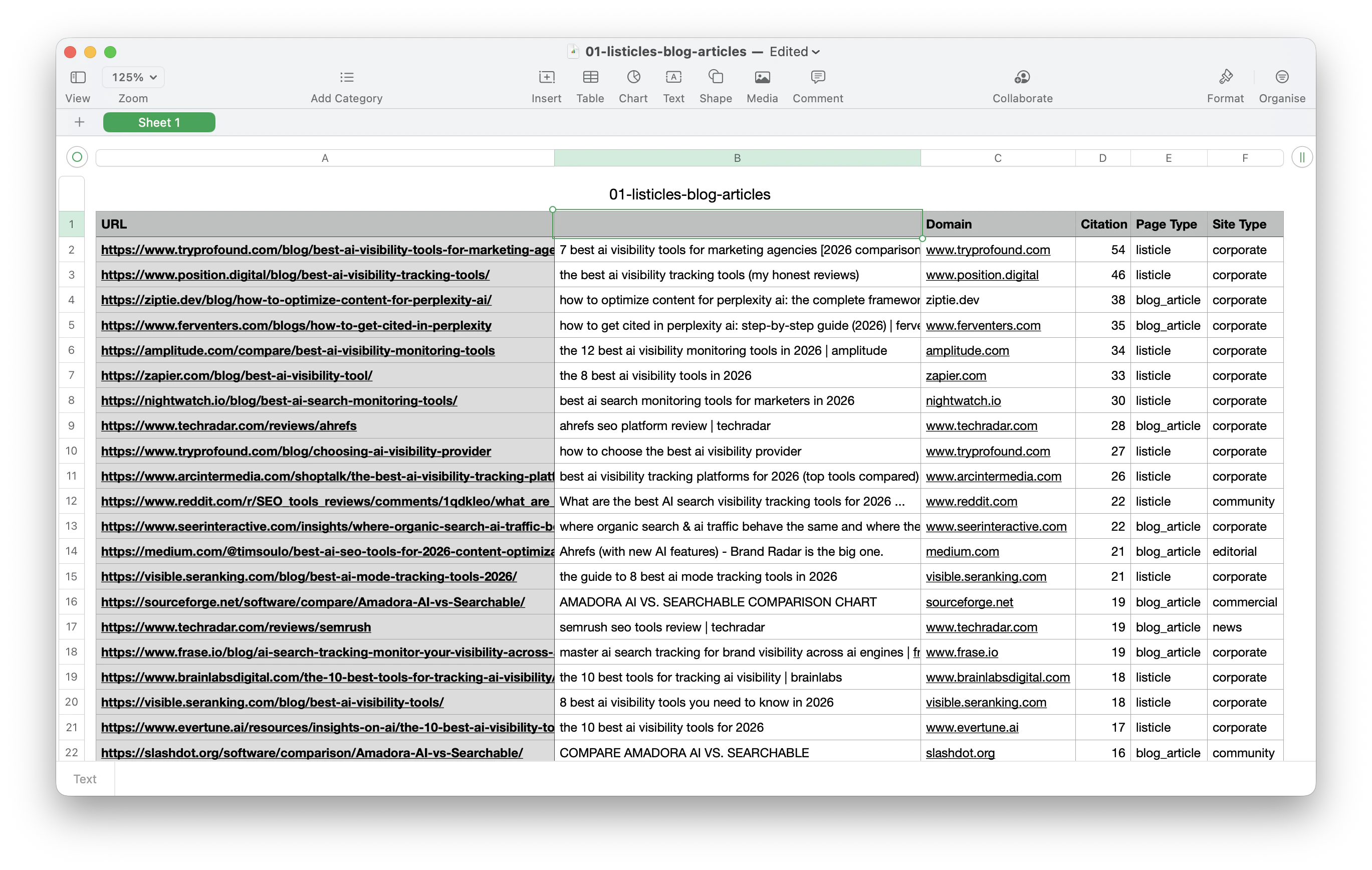
.png?fit=max&auto=format&n=s7j3SeJgl7b2xP1q&q=85&s=bcc894c7cbffe408f06ae368d8dbc680) * **Authority Building Lists:** Generate actionable CSVs of listicles, podcasts, and editorial pubs where your brand is currently missing.
* **Authority Building Lists:** Generate actionable CSVs of listicles, podcasts, and editorial pubs where your brand is currently missing.
 **AI Visibility Audits. Pitch-Ready in Minutes for Agencies.**
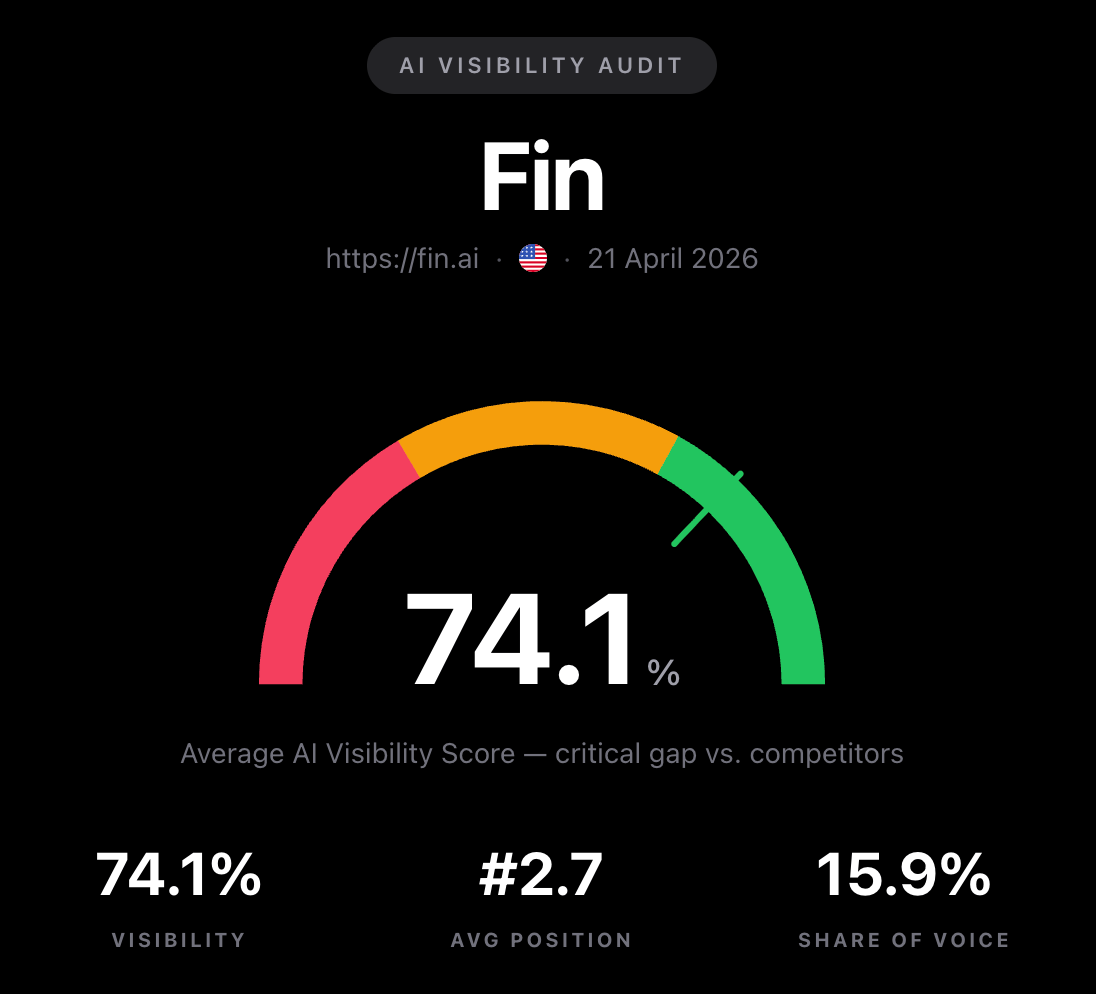
We just shipped one of the biggest things we've ever built — a full **AI Visibility Audit** that any agency can run on a client (or a prospect) end-to-end, and hand back as a polished, white-label report.
**AI Visibility Audits. Pitch-Ready in Minutes for Agencies.**
We just shipped one of the biggest things we've ever built — a full **AI Visibility Audit** that any agency can run on a client (or a prospect) end-to-end, and hand back as a polished, white-label report.
 **Here's all:**
1. **One-Click, 10-Section Audit** Pick any domain and up to 4 competitors — we run the prompts across ChatGPT, Perplexity, and Gemini, then deliver a full report covering the AI Visibility Score, Reality Check (raw AI answers for real buyer queries), Perception & Trust, Visibility by Topic mapped to the funnel, Competitor Comparison, and Sources & Citations.
**Here's all:**
1. **One-Click, 10-Section Audit** Pick any domain and up to 4 competitors — we run the prompts across ChatGPT, Perplexity, and Gemini, then deliver a full report covering the AI Visibility Score, Reality Check (raw AI answers for real buyer queries), Perception & Trust, Visibility by Topic mapped to the funnel, Competitor Comparison, and Sources & Citations.
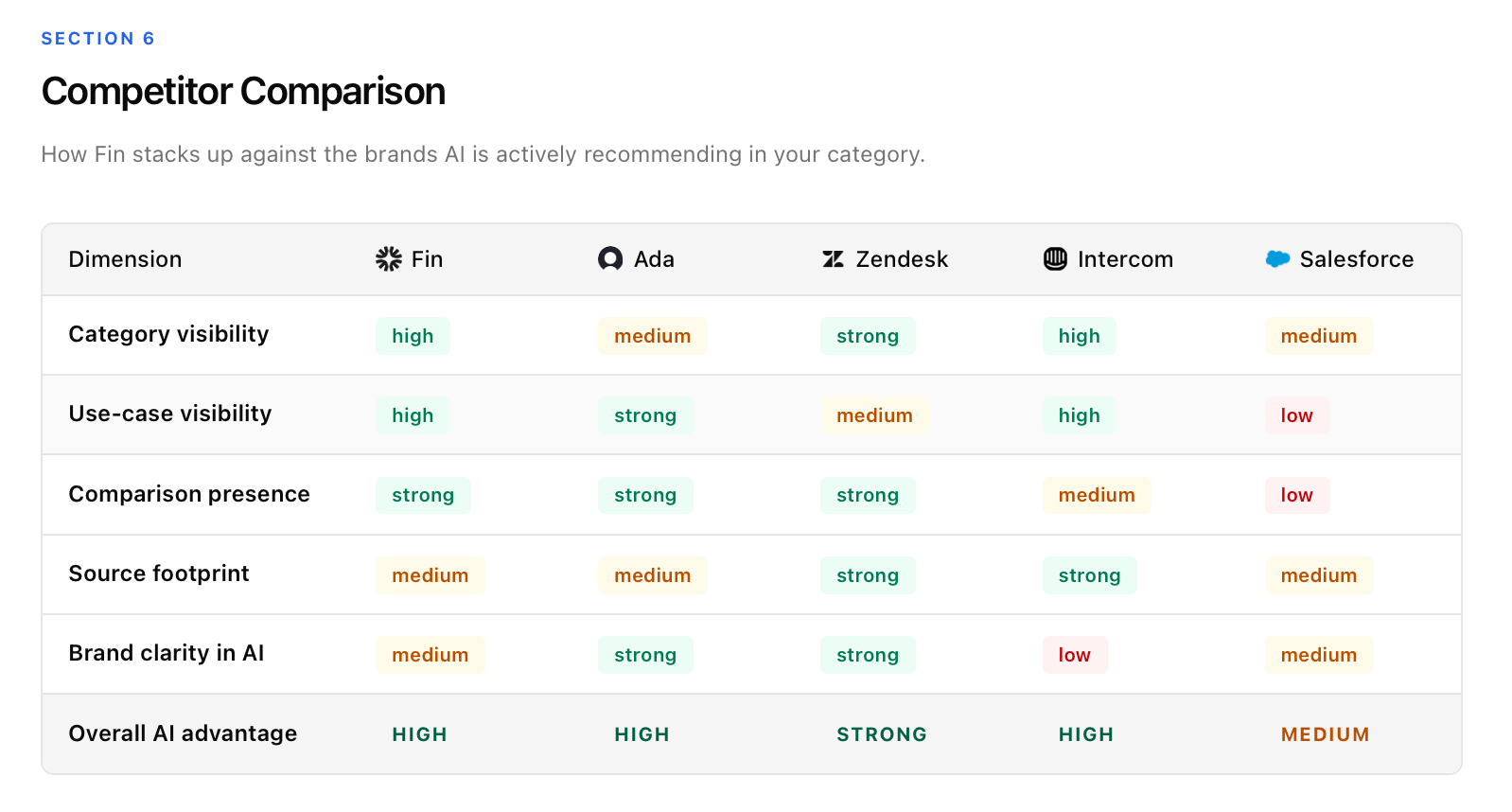 2. **Built-in Action Plan** Every gap is written up as **Finding → Root Cause → Business Impact**, then rolled into a phased **90-Day Roadmap** (Foundation → Expansion → Authority) with a CRITICAL/HIGH/MEDIUM priority matrix — basically a pre-built SOW you can hand to the client.
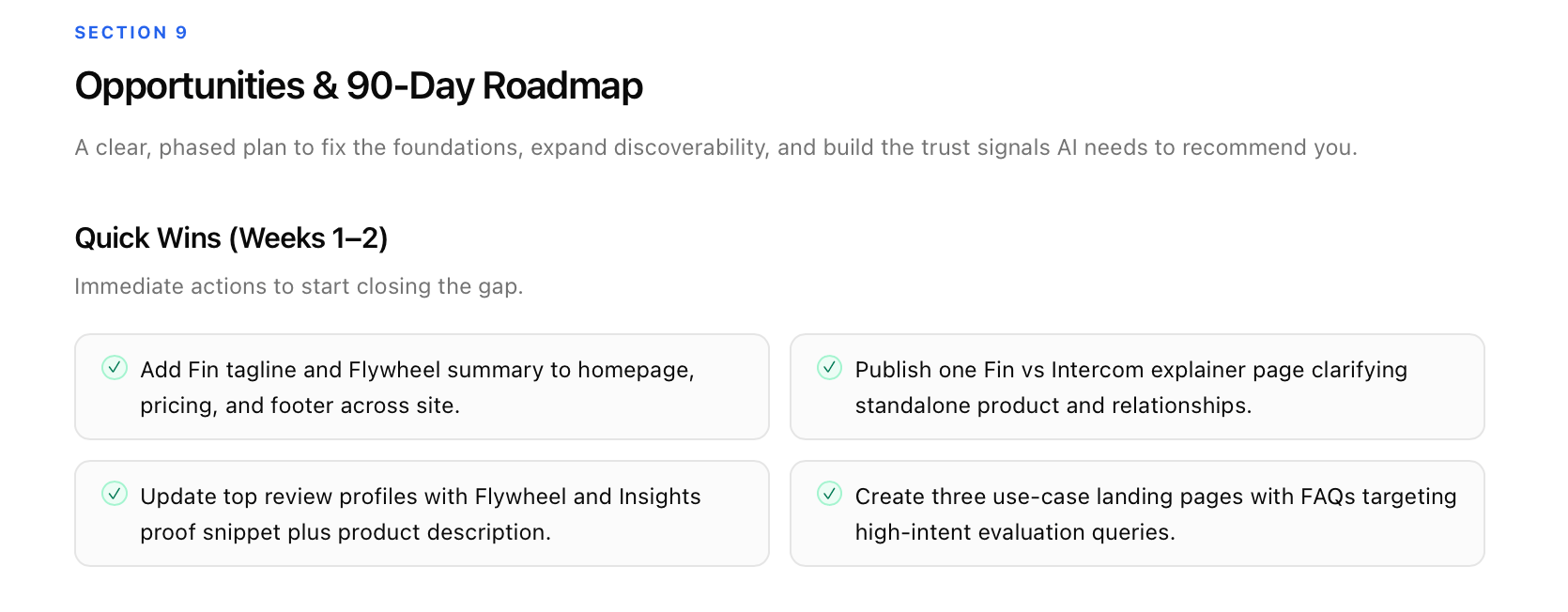 3. **White-Label & Pitch-Ready** Every audit ships as a clean, branded report you can send to a client, walk through on a pitch call, or attach to a proposal — no rebuilding it in Figma at 11 PM.
**Where to find it:** Head to the **Audits** tab in your dashboard and hit **New Audit**.
(Pro Tip: Run the audit on a *prospect* before the discovery call. Open the meeting with their Reality Check, walk them through the Roadmap, and convert the audit into the retainer.)
**Bulk Prompts, Saved Filters & Crawler Upgrades**
1. **Bulk Import & Export Prompts** You can bulk-import prompts via CSV, automatically mapping details like **Topic**, **Tags**, and **Location**.
3. **White-Label & Pitch-Ready** Every audit ships as a clean, branded report you can send to a client, walk through on a pitch call, or attach to a proposal — no rebuilding it in Figma at 11 PM.
**Where to find it:** Head to the **Audits** tab in your dashboard and hit **New Audit**.
(Pro Tip: Run the audit on a *prospect* before the discovery call. Open the meeting with their Reality Check, walk them through the Roadmap, and convert the audit into the retainer.)
**Bulk Prompts, Saved Filters & Crawler Upgrades**
1. **Bulk Import & Export Prompts** You can bulk-import prompts via CSV, automatically mapping details like **Topic**, **Tags**, and **Location**.
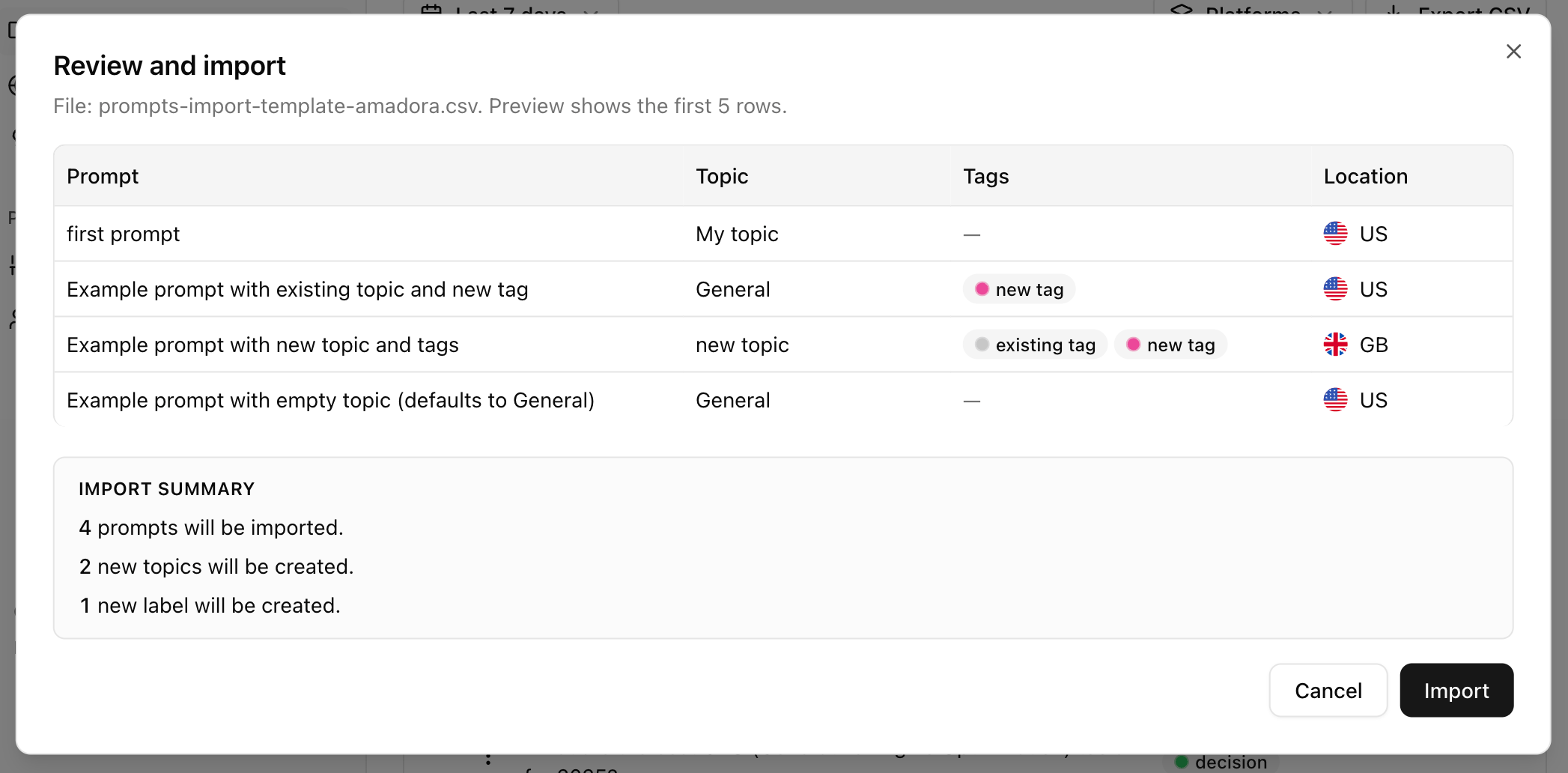 Additionally, you can now export your prompt table with all available data for external analysis.
2. **Share Dashboards with Saved Filters** When sharing your Amadora dashboard from the overview section, you can now toggle Include current filters in link.
Additionally, you can now export your prompt table with all available data for external analysis.
2. **Share Dashboards with Saved Filters** When sharing your Amadora dashboard from the overview section, you can now toggle Include current filters in link.
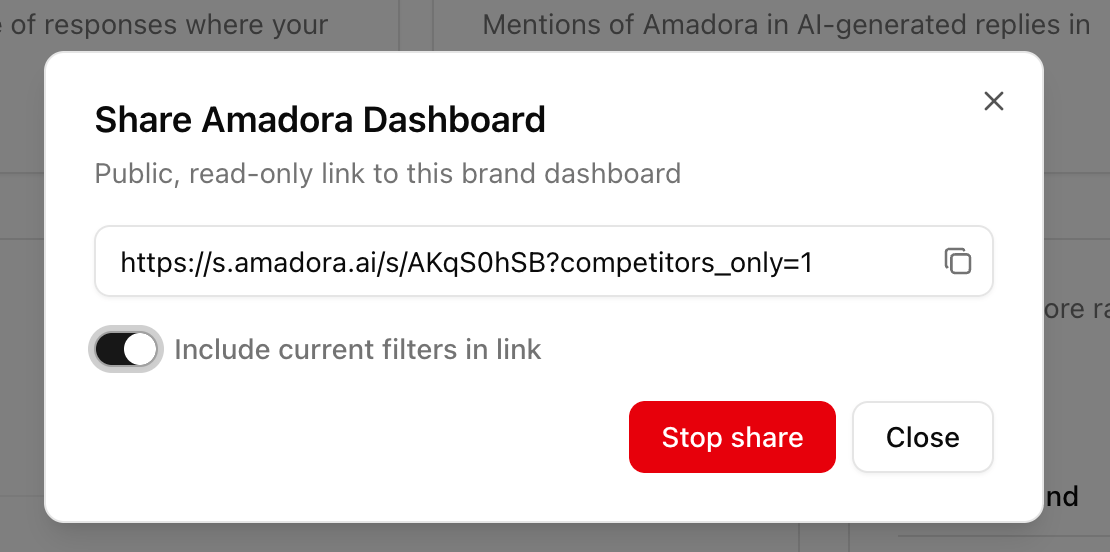 This generates a public, read-only link that preserves the exact filters you’ve set up.
3. **Improved Brand Mention Recognition** We’ve upgraded our crawlers to better navigate website protections. This fixes an issue where some pages appeared to have no mentions, ensuring much more accurate brand parsing in AI citations.
4. **Updated Citation Content Tagging** We’ve simplified and updated how we classify web pages and AI citations. Updated data will appear in your account within the next few days.
**Brand Mentions & Competitive Visibility**
We’ve added Brand Mention Analysis so you can see under the hood and track how your brand is discussed across the specific data sources LLMs use.
**What's New:**
Head over to the **Sources and Citations** section and go to **Brand Presence in Citations** and toggle to the **Competitors** tab to find three new metrics:
This generates a public, read-only link that preserves the exact filters you’ve set up.
3. **Improved Brand Mention Recognition** We’ve upgraded our crawlers to better navigate website protections. This fixes an issue where some pages appeared to have no mentions, ensuring much more accurate brand parsing in AI citations.
4. **Updated Citation Content Tagging** We’ve simplified and updated how we classify web pages and AI citations. Updated data will appear in your account within the next few days.
**Brand Mentions & Competitive Visibility**
We’ve added Brand Mention Analysis so you can see under the hood and track how your brand is discussed across the specific data sources LLMs use.
**What's New:**
Head over to the **Sources and Citations** section and go to **Brand Presence in Citations** and toggle to the **Competitors** tab to find three new metrics:
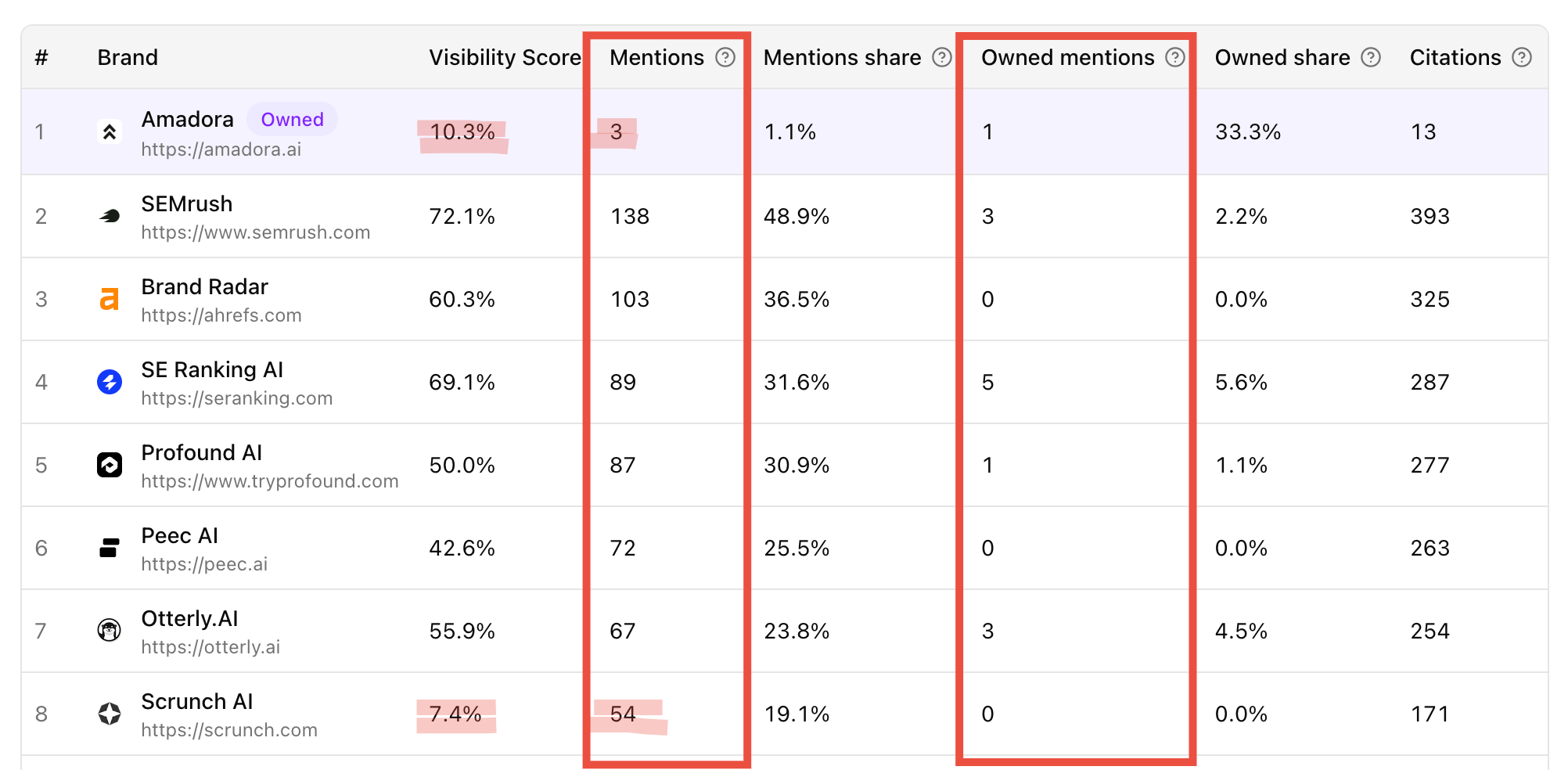 * **Mentions:** The number of unique, AI-cited documents that mention your brand.
* **Owned Mentions:** A breakdown of how many documents were published by *you* versus external sources.
* **Citation Impact:** How many times those specific documents were actually used as a citation in an AI response.
(Pro Tip: Use our filters to slice this data by Topic, Region, Language, or LLM—like GPT-4 or Claude—to see how your reputation shifts across different models.)
**Prompt Tagging is live!!**
We just rolled out a way to make your analytics way more precise. You can now add tags to your prompts to keep everything organized and easy to track.
* **Mentions:** The number of unique, AI-cited documents that mention your brand.
* **Owned Mentions:** A breakdown of how many documents were published by *you* versus external sources.
* **Citation Impact:** How many times those specific documents were actually used as a citation in an AI response.
(Pro Tip: Use our filters to slice this data by Topic, Region, Language, or LLM—like GPT-4 or Claude—to see how your reputation shifts across different models.)
**Prompt Tagging is live!!**
We just rolled out a way to make your analytics way more precise. You can now add tags to your prompts to keep everything organized and easy to track.
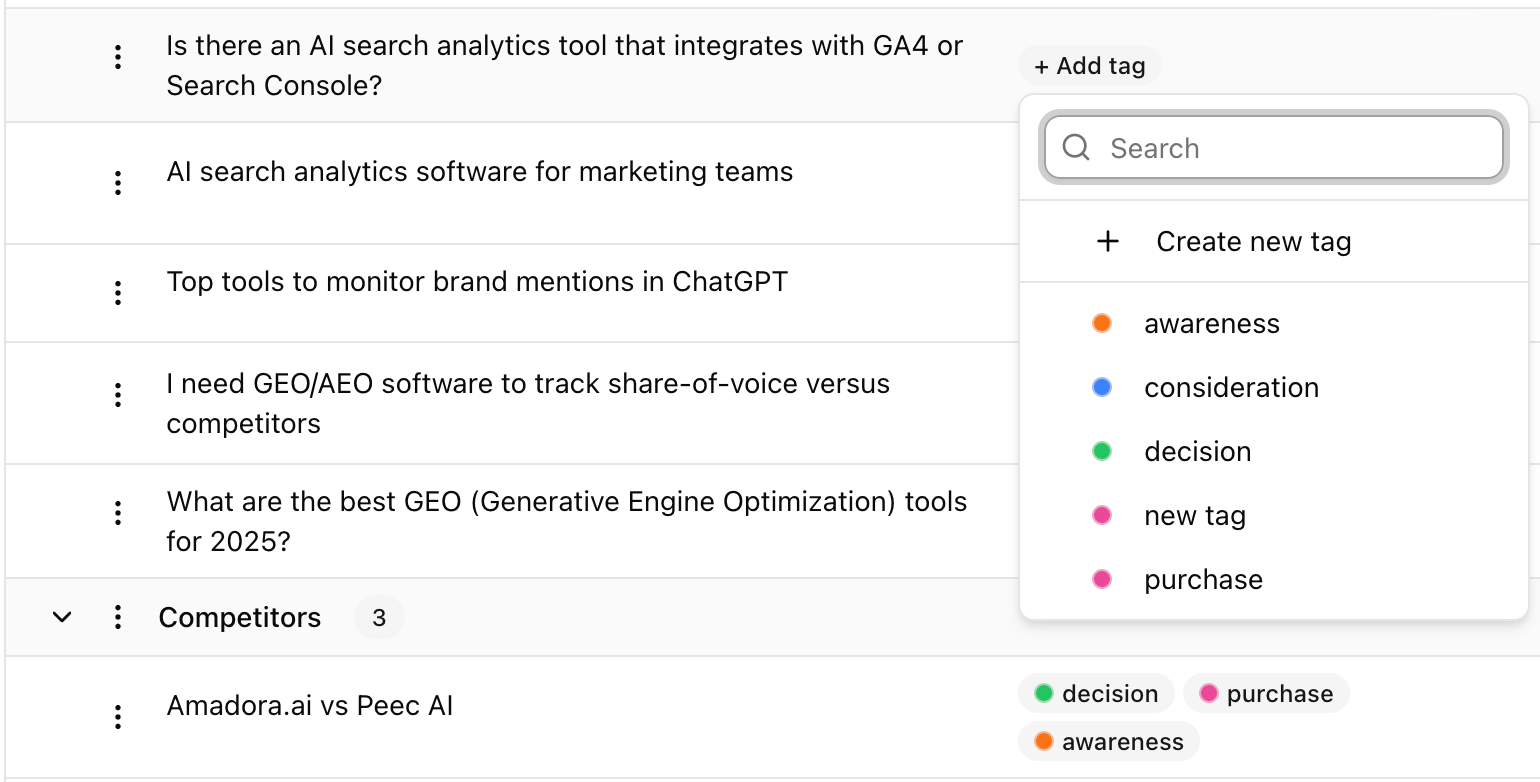 **Why use it?**
* **Map the Funnel:** Tag prompts as *Awareness*, *Consideration*, or *Decision* stage.
* **Segment by ICP:** Mark which prompts belong to which customer profile.
* **Filter Everything:** You can now filter your entire dashboard and all your graphs by these tags.
**Where to find it:** Head over to your prompt list to start tagging, or manage your full list in **Brand Preferences**.
**Brand Citation & Gap Analysis**
You can now track exactly where your brand is mentioned—and where you’re missing out—within the specific URLs that AI models cite.
Here’s all:
**Real-Time Mention Detection:** The URLs list now features a **"Mentioned"** column. We automatically scan cited documents to verify if your brand is explicitly named, instantly validating if a source actively boosts your visibility.
**Why use it?**
* **Map the Funnel:** Tag prompts as *Awareness*, *Consideration*, or *Decision* stage.
* **Segment by ICP:** Mark which prompts belong to which customer profile.
* **Filter Everything:** You can now filter your entire dashboard and all your graphs by these tags.
**Where to find it:** Head over to your prompt list to start tagging, or manage your full list in **Brand Preferences**.
**Brand Citation & Gap Analysis**
You can now track exactly where your brand is mentioned—and where you’re missing out—within the specific URLs that AI models cite.
Here’s all:
**Real-Time Mention Detection:** The URLs list now features a **"Mentioned"** column. We automatically scan cited documents to verify if your brand is explicitly named, instantly validating if a source actively boosts your visibility.
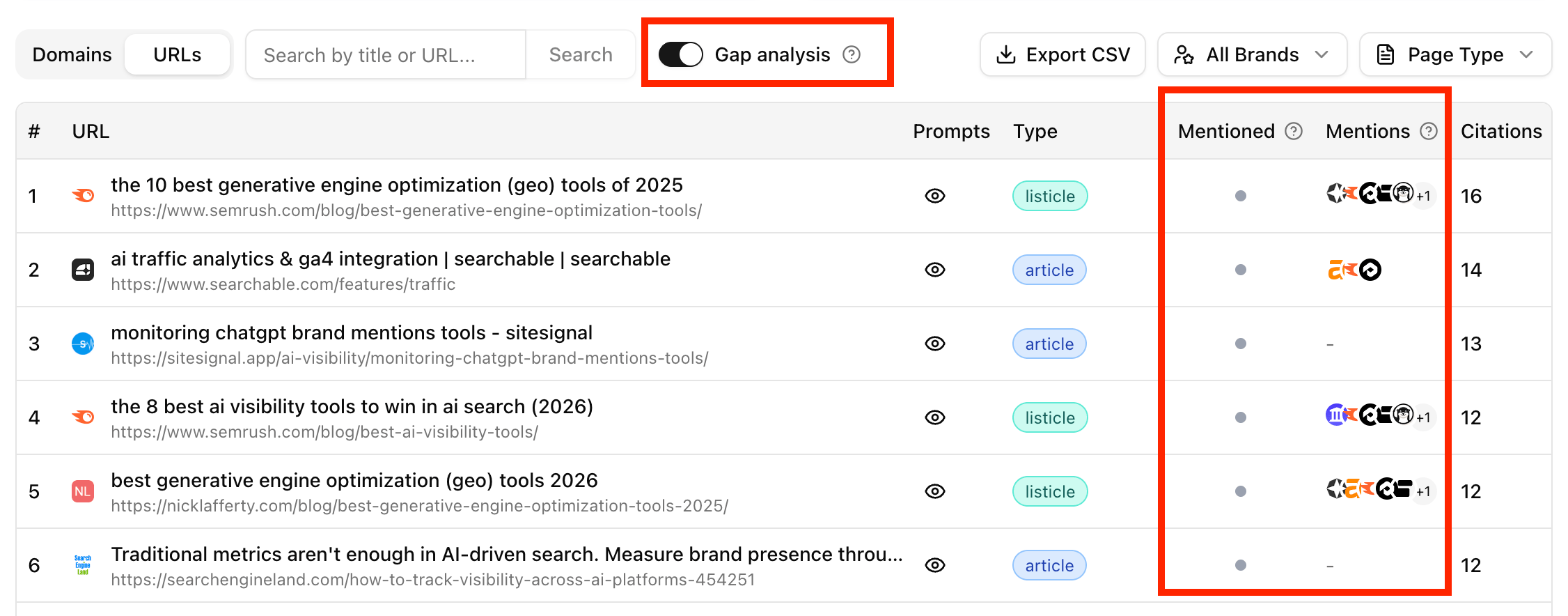 **Gap Analysis Filter:** Toggle this filter to hide URLs that already mention you. This leaves only the trusted sources that AI cites but where your brand is missing—perfect targets for targeted outreach.
**Competitor Benchmarking:** Filter cited URLs by the rivals in your Competitor Tab. Seeing exactly which third-party sites mention them helps you determine the authority threshold needed to trigger your own AI recommendations.
**Gap Analysis Filter:** Toggle this filter to hide URLs that already mention you. This leaves only the trusted sources that AI cites but where your brand is missing—perfect targets for targeted outreach.
**Competitor Benchmarking:** Filter cited URLs by the rivals in your Competitor Tab. Seeing exactly which third-party sites mention them helps you determine the authority threshold needed to trigger your own AI recommendations.
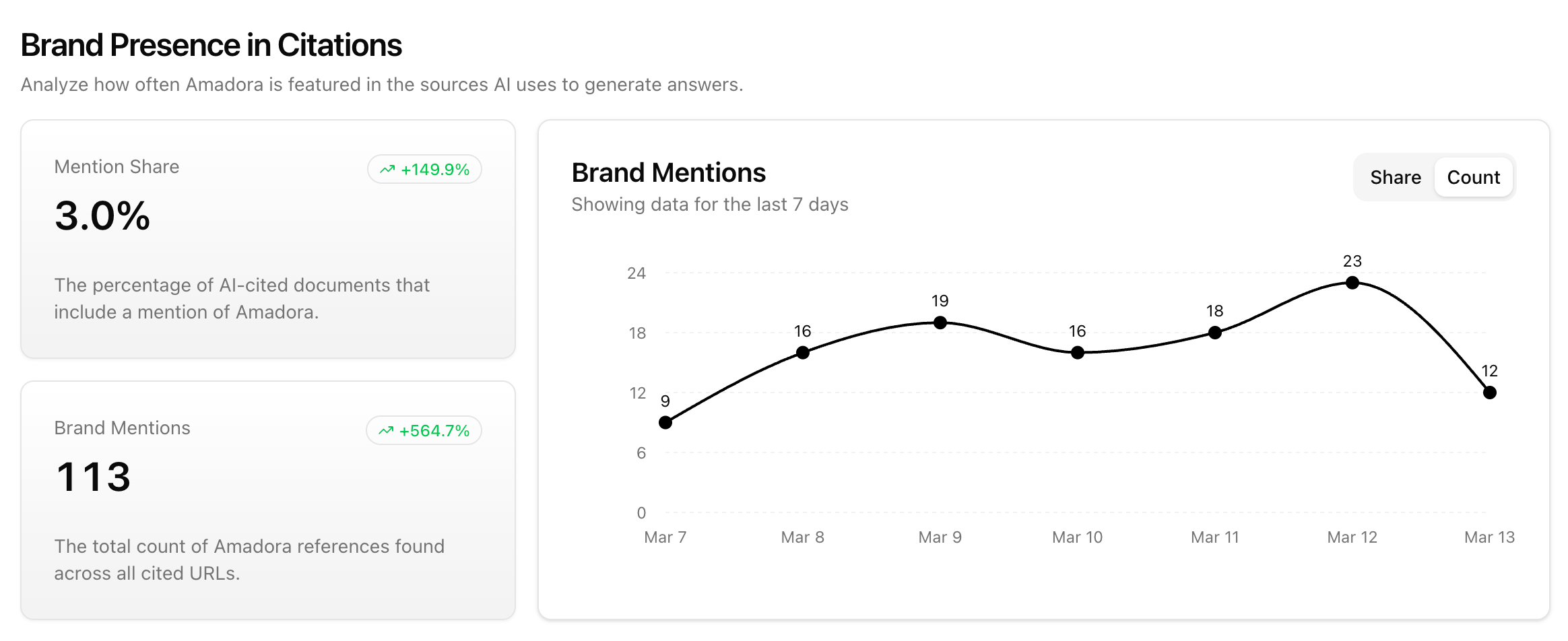
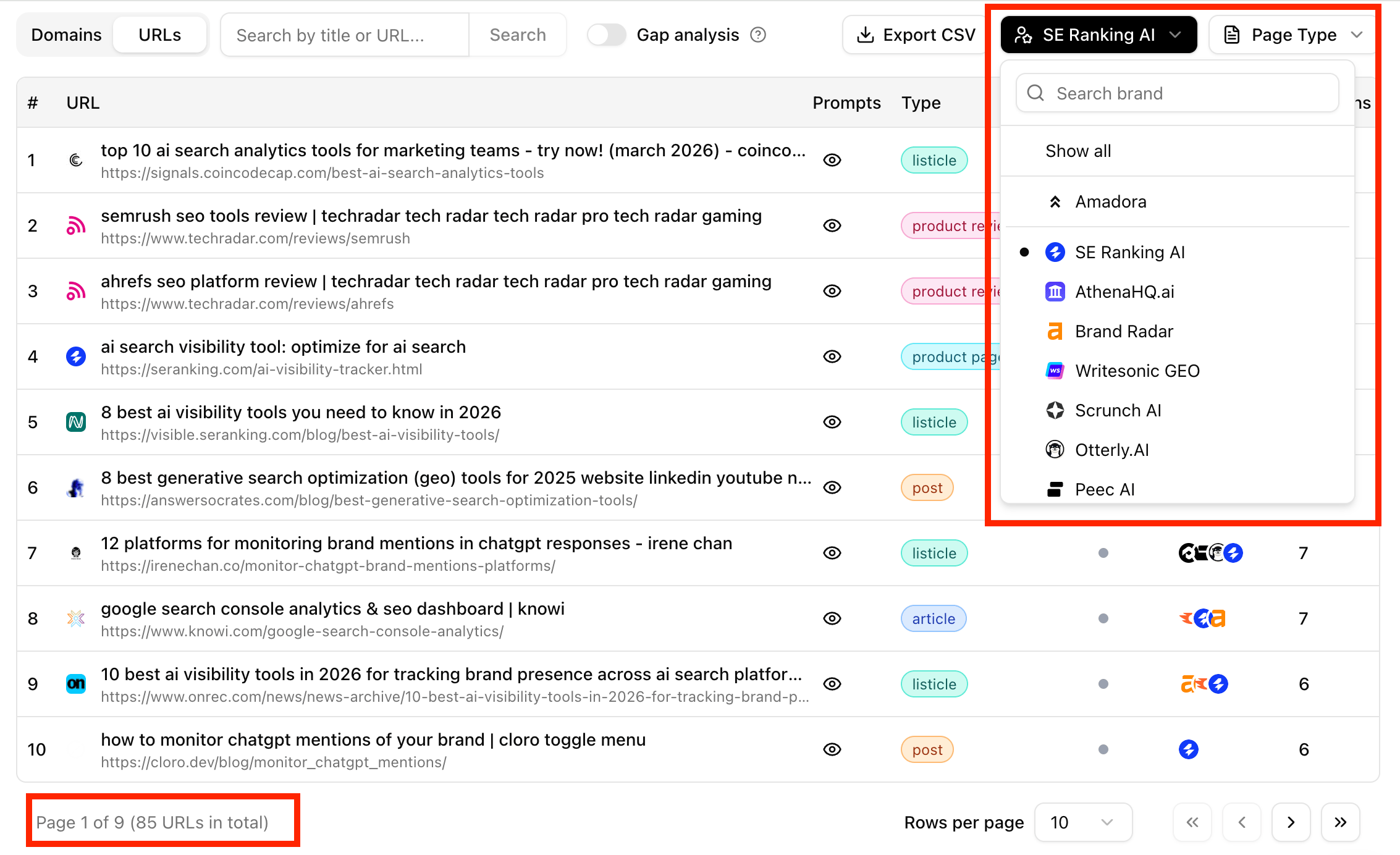 **Brand Presence Metrics:** The analytics dashboard now shows your **Mention Share**, total **Brand Mentions**, and visual **Progress Tracking** to tie campaigns directly to increased AI visibility.
 **More Engines. More Control. No Plan-Hopping.**
We just pushed a significant update to the Amadora AI to give you more flexibility in how you track your brand’s presence across the AI-verse.
**Here’s the Updates:**
* **The “Big Three” are now Default:** Every prompt now automatically tracks across ChatGPT, Perplexity, and Gemini\*\*.\*\*
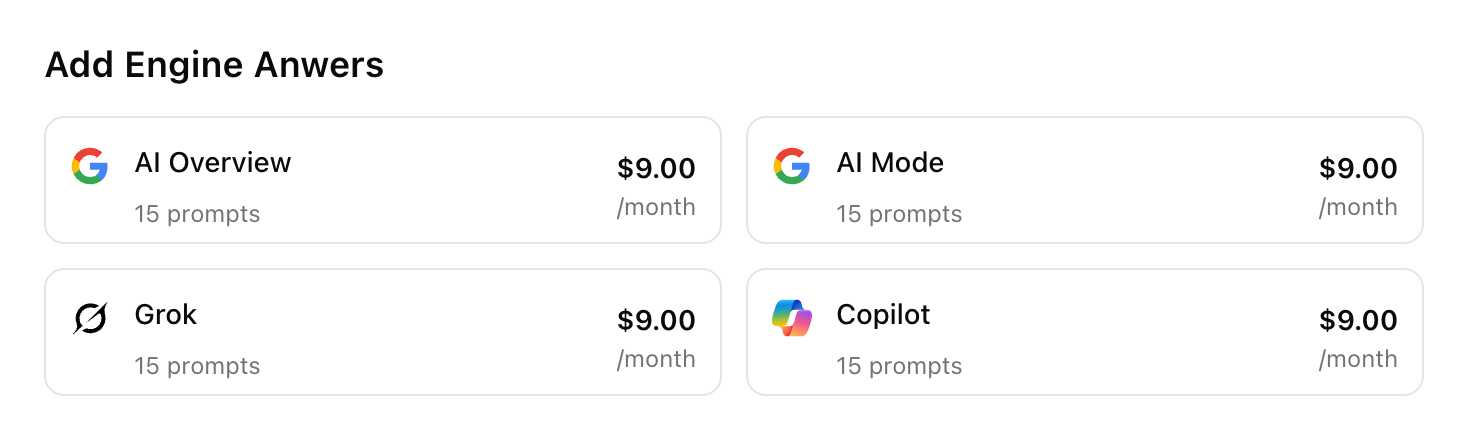
* **New Engine Add-ons:** Need to see what’s happening on Microsoft Copilot, Grok, or Google AI Mode? You can now add these (plus Google AI Overview) as custom add-ons starting at just \$9/mo.
**More Engines. More Control. No Plan-Hopping.**
We just pushed a significant update to the Amadora AI to give you more flexibility in how you track your brand’s presence across the AI-verse.
**Here’s the Updates:**
* **The “Big Three” are now Default:** Every prompt now automatically tracks across ChatGPT, Perplexity, and Gemini\*\*.\*\*
* **New Engine Add-ons:** Need to see what’s happening on Microsoft Copilot, Grok, or Google AI Mode? You can now add these (plus Google AI Overview) as custom add-ons starting at just \$9/mo.
 * **Granular LLM Selection:** You can now toggle specific LLMs for individual prompts. Since users ask things differently on ChatGPT vs. Google AI Overview, your tracking should be just as specific.
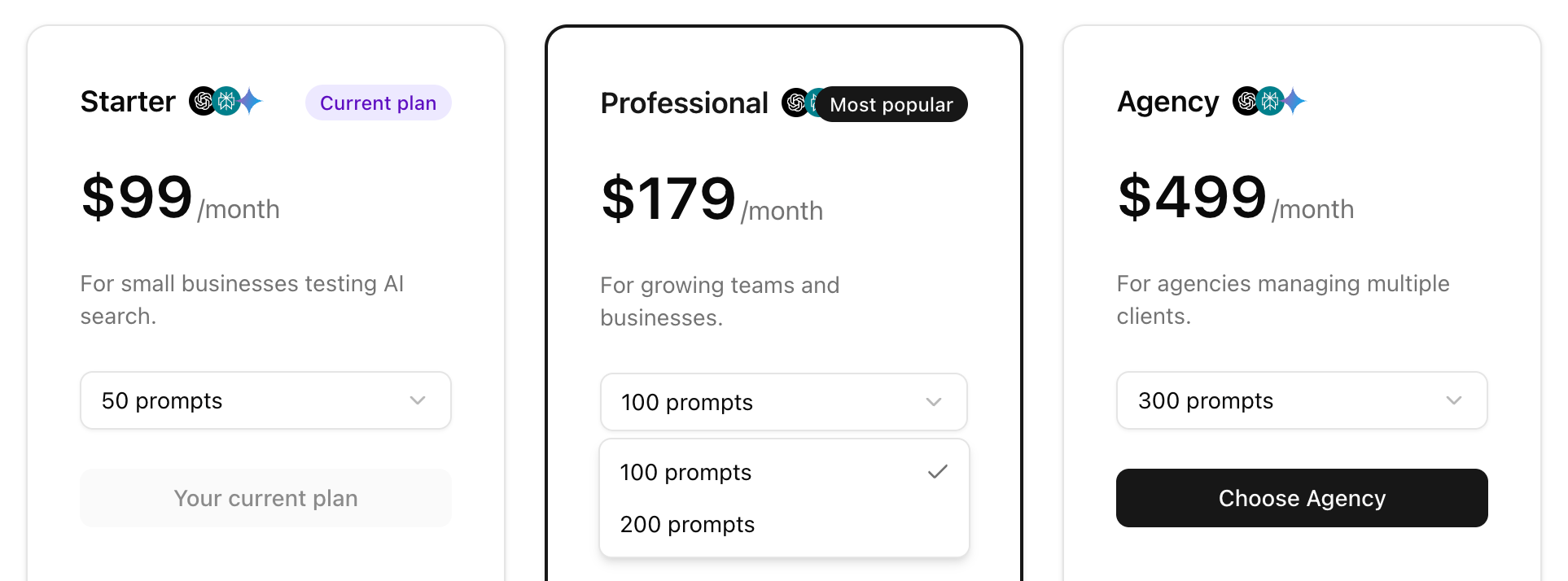
* **Scale Without the Upgrade:** Hit your limit? You no longer have to jump to a whole new plan. We’ve added “Prompt Grades”—for example, if you’re on the **Starter Plan**, you can now toggle between 15 or 50 prompts instantly.
* **Granular LLM Selection:** You can now toggle specific LLMs for individual prompts. Since users ask things differently on ChatGPT vs. Google AI Overview, your tracking should be just as specific.
* **Scale Without the Upgrade:** Hit your limit? You no longer have to jump to a whole new plan. We’ve added “Prompt Grades”—for example, if you’re on the **Starter Plan**, you can now toggle between 15 or 50 prompts instantly.
 **Amadora Credits are live!**
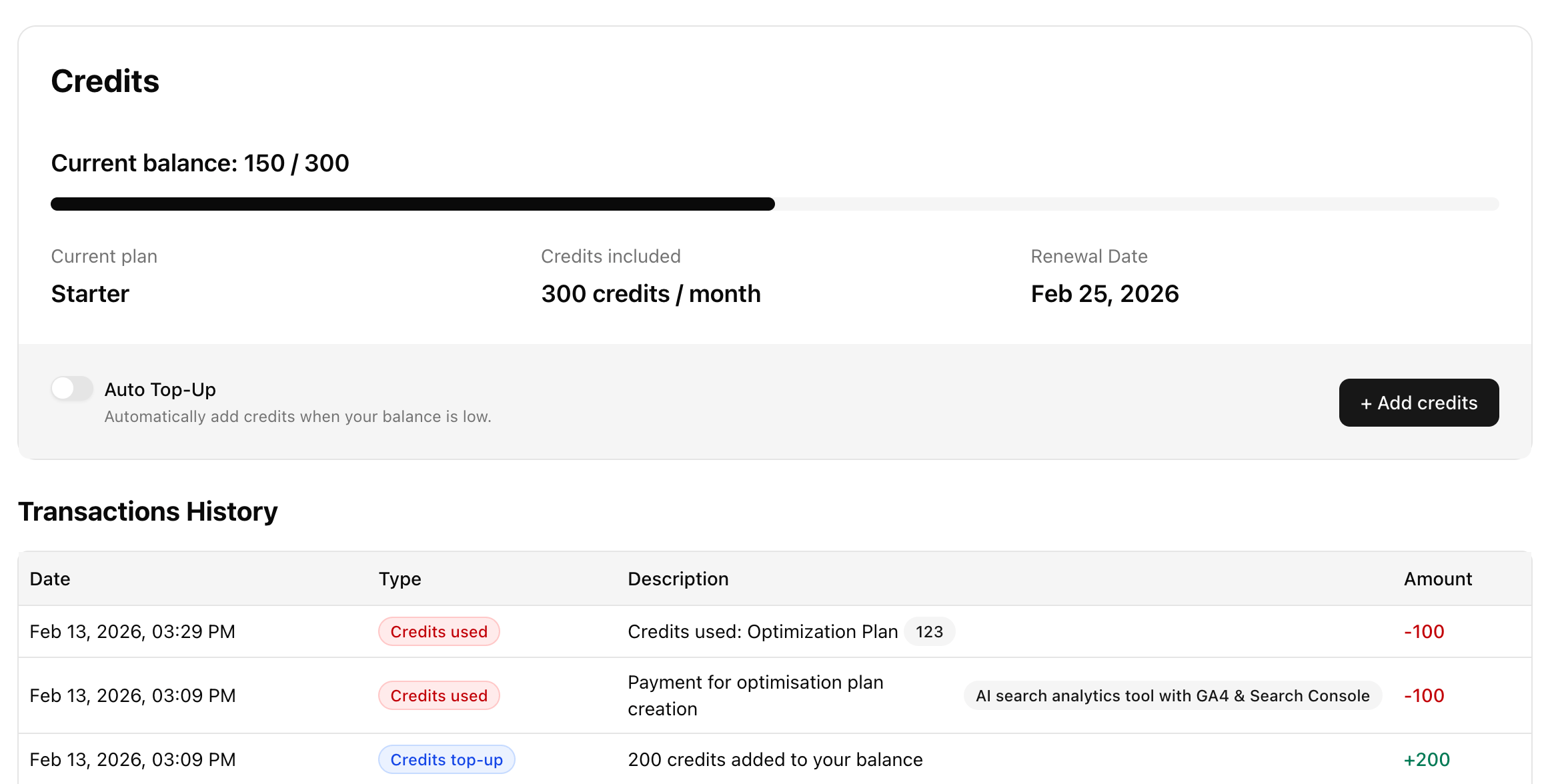
We’ve officially rolled out the **Credits system** to give everyone better control over their AI workflows. You’ll notice a new “Credits” tab in your dashboard where you can track your usage in real-time.
**Amadora Credits are live!**
We’ve officially rolled out the **Credits system** to give everyone better control over their AI workflows. You’ll notice a new “Credits” tab in your dashboard where you can track your usage in real-time.
 **The Quick Breakdown:**
* **Starter Plan:** 300 credits/mo
* **Professional:** 1,000 credits/mo
* **Agency:** 3,000 credits/mo *(Annual plans get a massive credit boost!)*
**What does it cost to run actions?**
* **100 credits:** AI search optimization plan (per prompt).
* **50 credits:** LLM Brand snapshot (coming soon).
**Cool extras:**
* **Rollover:** Monthly unused credits now carry over (max 2x your plan limit).
* **Auto Top-Up:** You can now toggle “Auto Top-Up” to ensure your workflows never pause when the balance gets low.
* **Pre-execution visibility:** You’ll see the cost *before* you hit “run.”
**Need more?** One-time packs are available starting at 200 credits for \$49.
**Better Data, Deeper Insights: The Latest Amadora AI Update**
Our latest deployment focuses on giving you more granular control over your AI Overview data and smoothing out your workflow\..
**Connect Sources to Prompts:** We added a “Prompts” column to the *Domains / URLs* table. You can now correlate specific URLs directly to the prompts that surfaced them, giving you a clearer view of the “Why” behind the citation.
**The Quick Breakdown:**
* **Starter Plan:** 300 credits/mo
* **Professional:** 1,000 credits/mo
* **Agency:** 3,000 credits/mo *(Annual plans get a massive credit boost!)*
**What does it cost to run actions?**
* **100 credits:** AI search optimization plan (per prompt).
* **50 credits:** LLM Brand snapshot (coming soon).
**Cool extras:**
* **Rollover:** Monthly unused credits now carry over (max 2x your plan limit).
* **Auto Top-Up:** You can now toggle “Auto Top-Up” to ensure your workflows never pause when the balance gets low.
* **Pre-execution visibility:** You’ll see the cost *before* you hit “run.”
**Need more?** One-time packs are available starting at 200 credits for \$49.
**Better Data, Deeper Insights: The Latest Amadora AI Update**
Our latest deployment focuses on giving you more granular control over your AI Overview data and smoothing out your workflow\..
**Connect Sources to Prompts:** We added a “Prompts” column to the *Domains / URLs* table. You can now correlate specific URLs directly to the prompts that surfaced them, giving you a clearer view of the “Why” behind the citation.
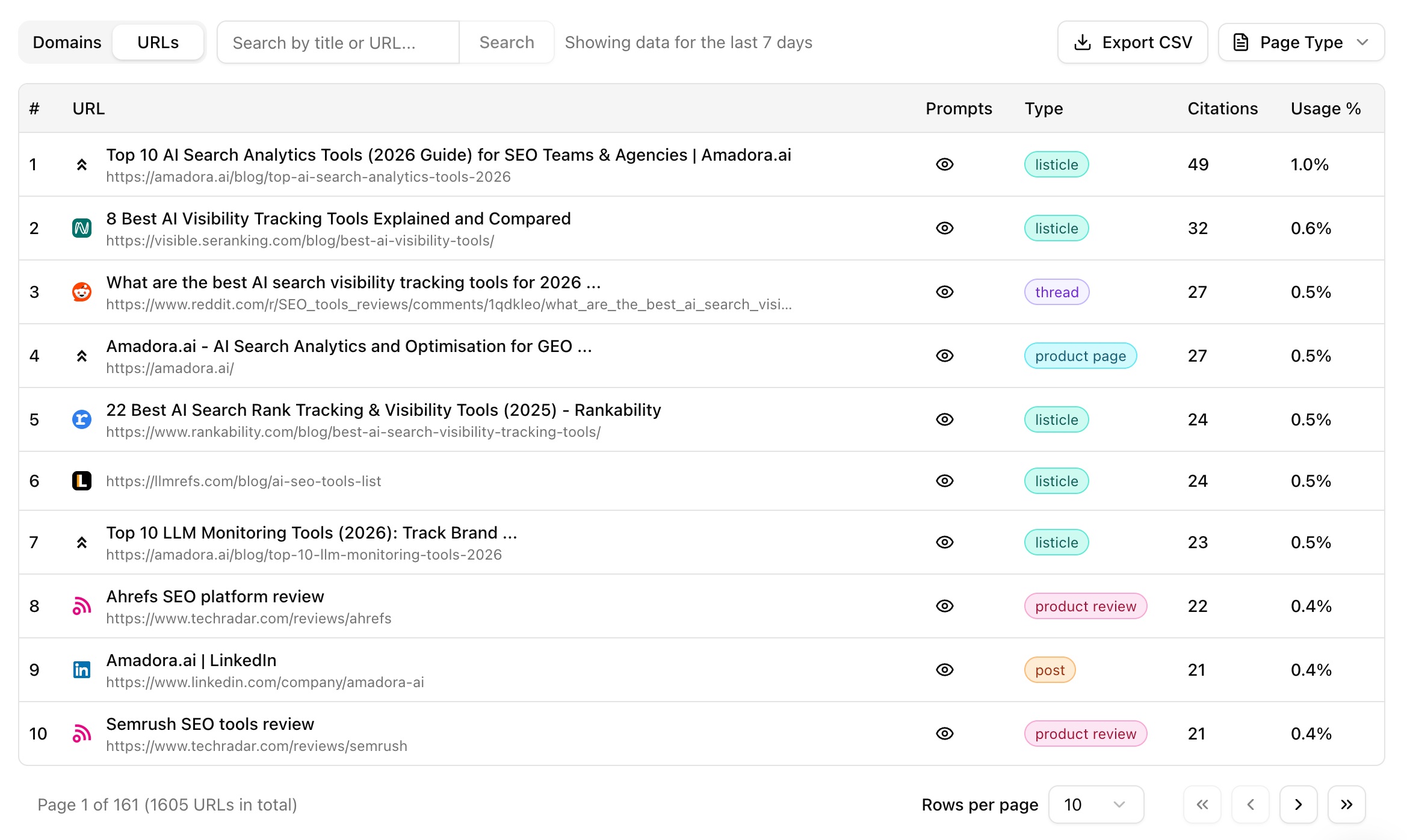 **Precision Tagging:** We fixed citation errors and refined our content types.
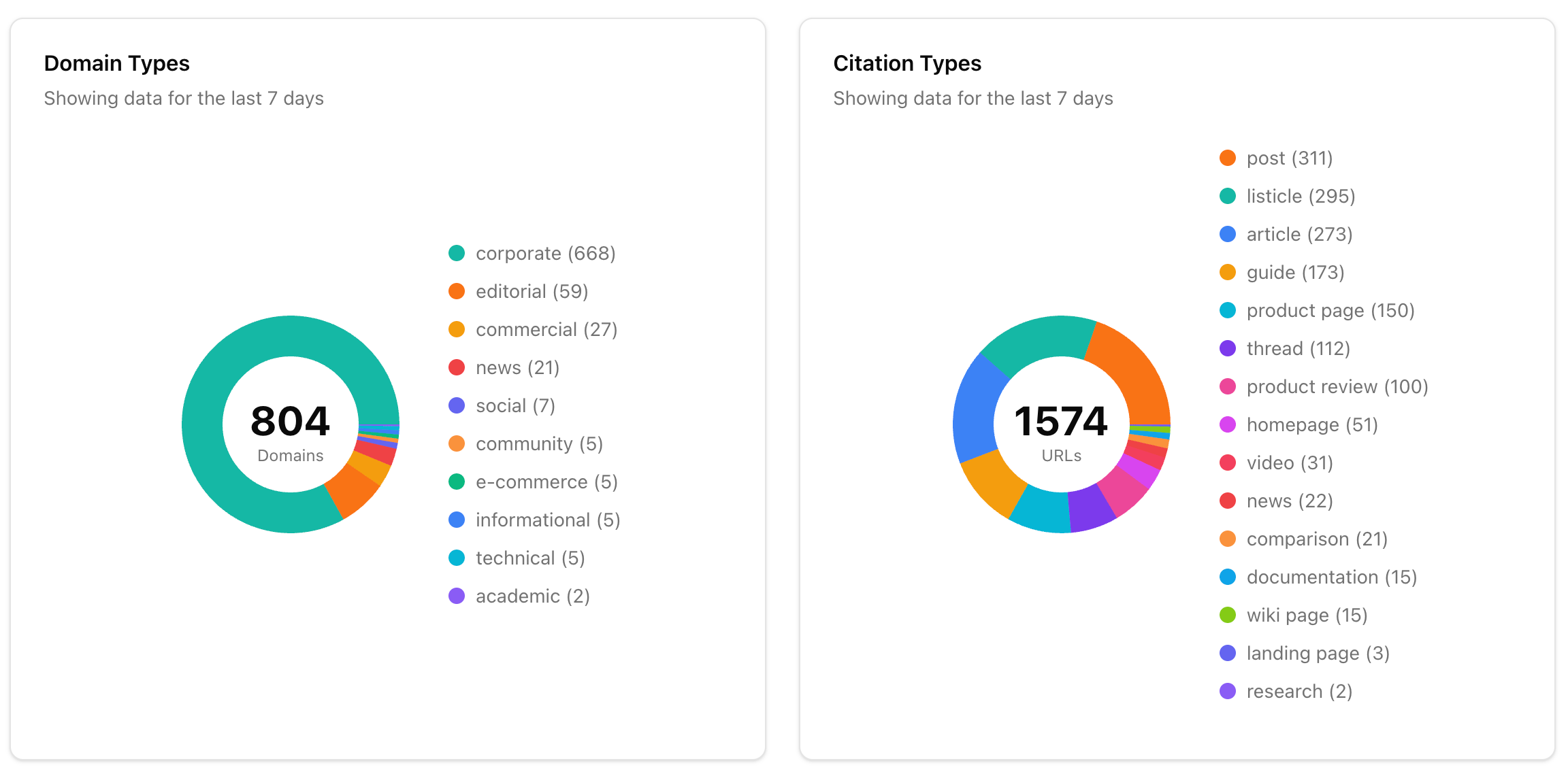 * YouTube = Video
* Reddit/LinkedIn = Post
* Unknowns resolved to Landing Pages, Product Pages, etc.
**Agency-Grade Utility:**
* **Search:** Quickly filter through domains/URLs in the Sources tab.
* **Exports:** Improved CSV handling for massive datasets.
* **UI/UX:** Added pagination to the Competitors table and shipped 10+ interface improvements.
**Complete Team Management is here!**
We’ve just rolled out the **Teammates** page to give you full control over your workspace.
Here’s what’s new:
* **Invite & Manage:** Easily add new teammates or remove users in a few clicks.
* YouTube = Video
* Reddit/LinkedIn = Post
* Unknowns resolved to Landing Pages, Product Pages, etc.
**Agency-Grade Utility:**
* **Search:** Quickly filter through domains/URLs in the Sources tab.
* **Exports:** Improved CSV handling for massive datasets.
* **UI/UX:** Added pagination to the Competitors table and shipped 10+ interface improvements.
**Complete Team Management is here!**
We’ve just rolled out the **Teammates** page to give you full control over your workspace.
Here’s what’s new:
* **Invite & Manage:** Easily add new teammates or remove users in a few clicks. 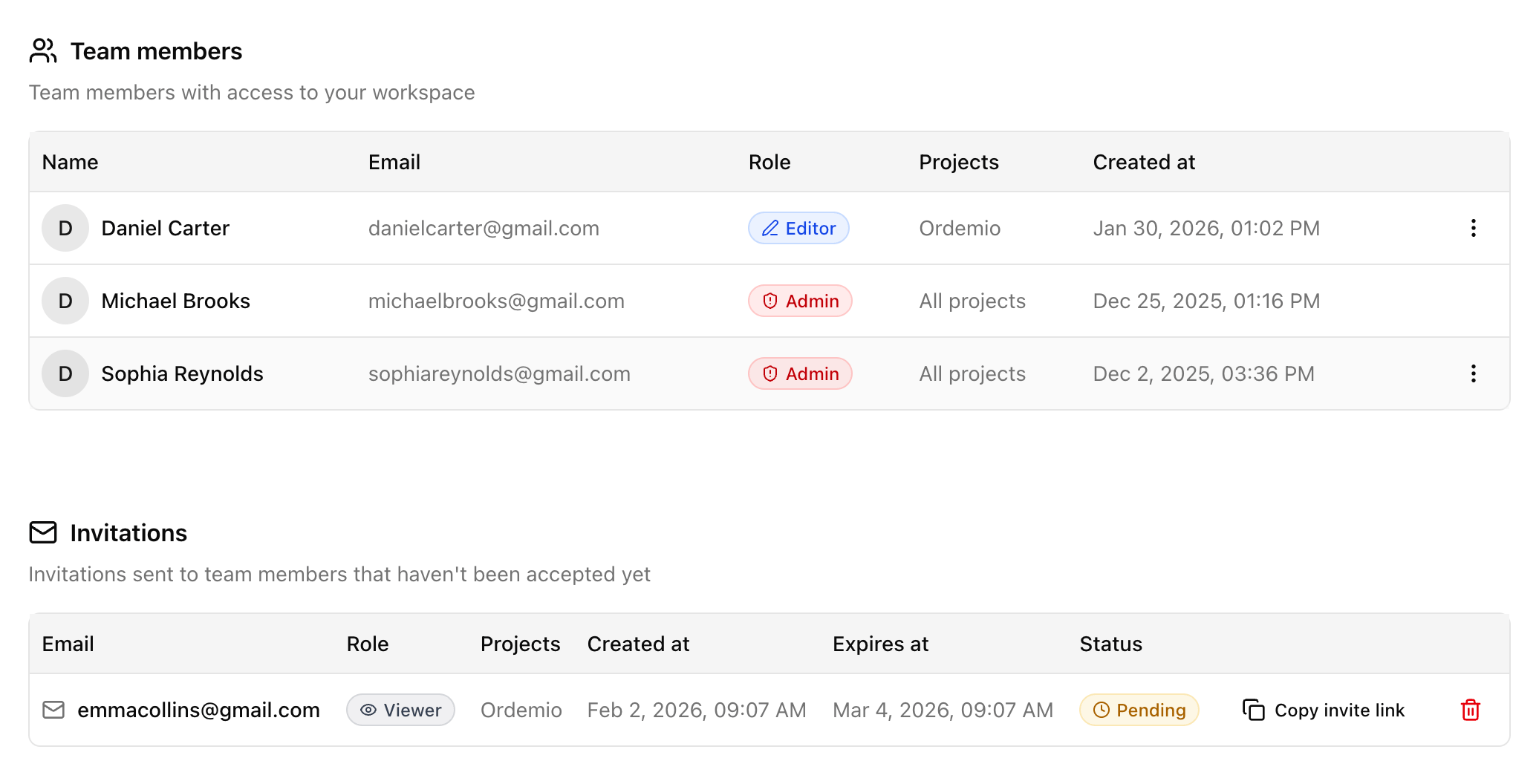 * **Granular Roles:**
 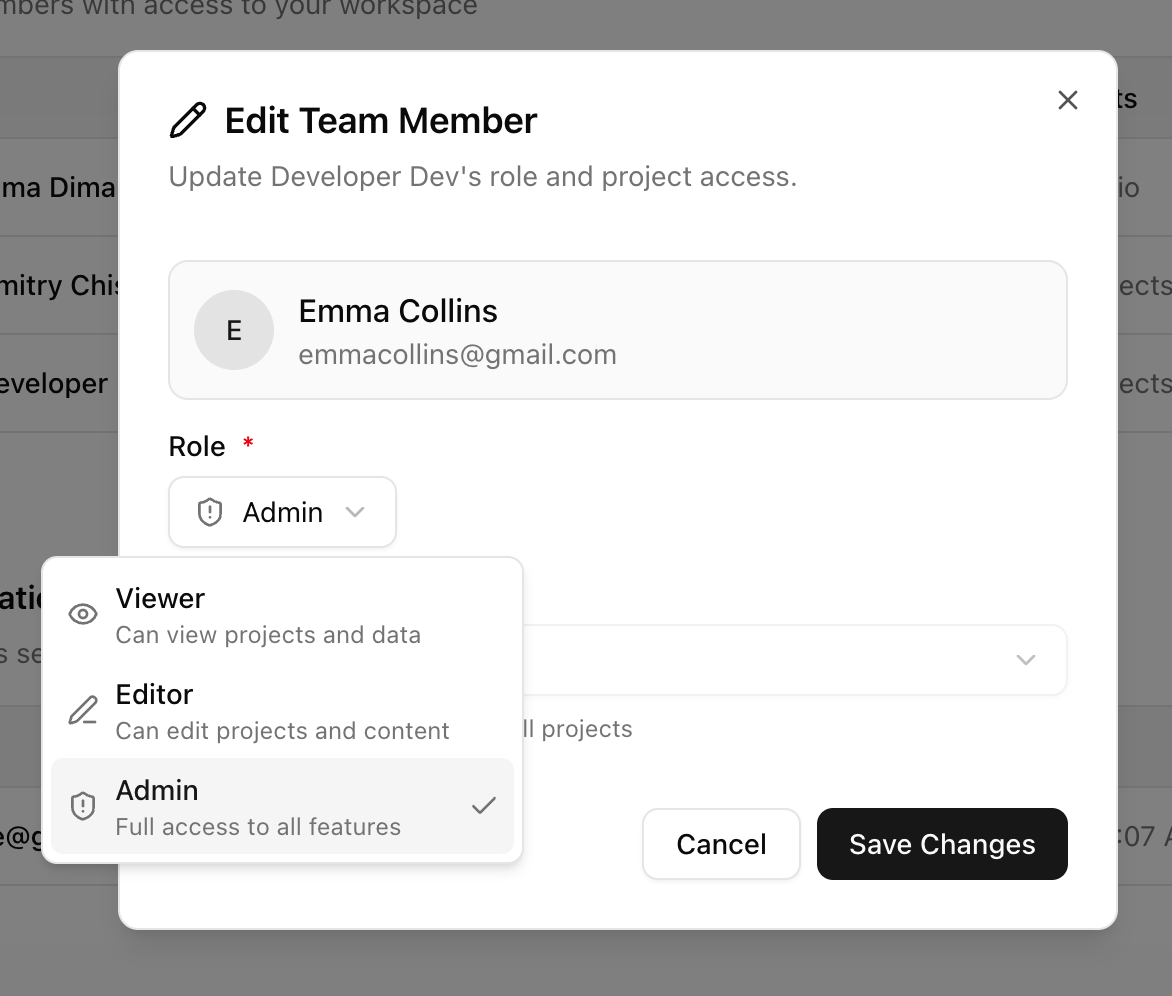 * **Admin:** Full access to everything.
* **Editor:** Can edit projects/content but can’t manage users.
* **Viewer:** Read-only access for stakeholders.
* **Project Control:** Assign users to specific brands (or “All Projects”) to keep workflows organized.
**The “Agency & Brand” Update**
We’ve just rolled out two of our most requested features to make managing multiple projects a breeze.
**The Brand Kit** You can now set up a permanent “Identity Profile” for every brand.
* **Admin:** Full access to everything.
* **Editor:** Can edit projects/content but can’t manage users.
* **Viewer:** Read-only access for stakeholders.
* **Project Control:** Assign users to specific brands (or “All Projects”) to keep workflows organized.
**The “Agency & Brand” Update**
We’ve just rolled out two of our most requested features to make managing multiple projects a breeze.
**The Brand Kit** You can now set up a permanent “Identity Profile” for every brand.
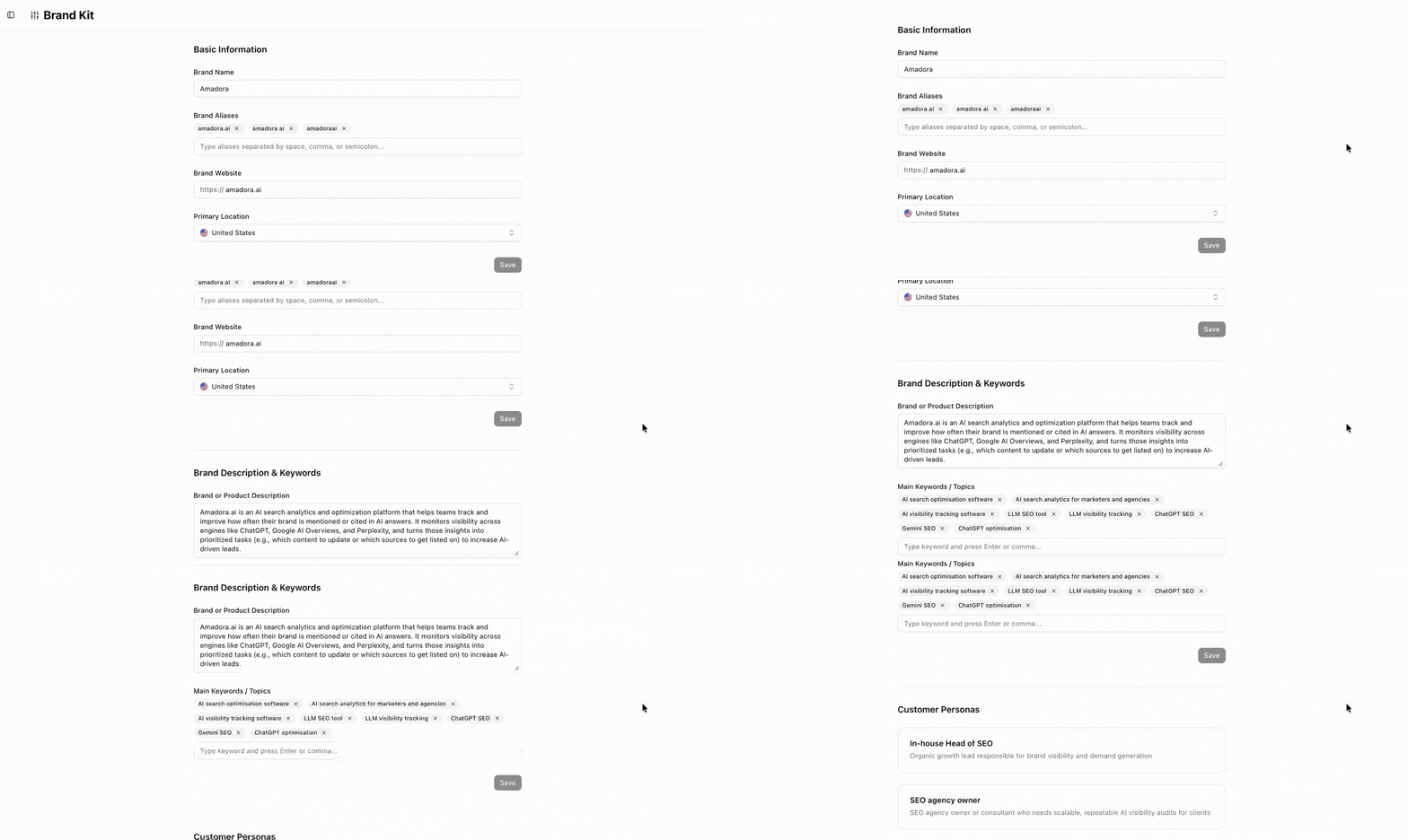 * Fill in your Brand Name, ICPs, Website, and Keywords once.
* Amadora AI uses this data to power your **Cluster/Topic extraction** (and soon, your Search Optimization plans!).
* *Admin Note:* Deleting a brand is permanent and requires a “confirm name” popup—no accidental clicks!
**Agency Dashboard** Tired of clicking through menus?
* Fill in your Brand Name, ICPs, Website, and Keywords once.
* Amadora AI uses this data to power your **Cluster/Topic extraction** (and soon, your Search Optimization plans!).
* *Admin Note:* Deleting a brand is permanent and requires a “confirm name” popup—no accidental clicks!
**Agency Dashboard** Tired of clicking through menus?
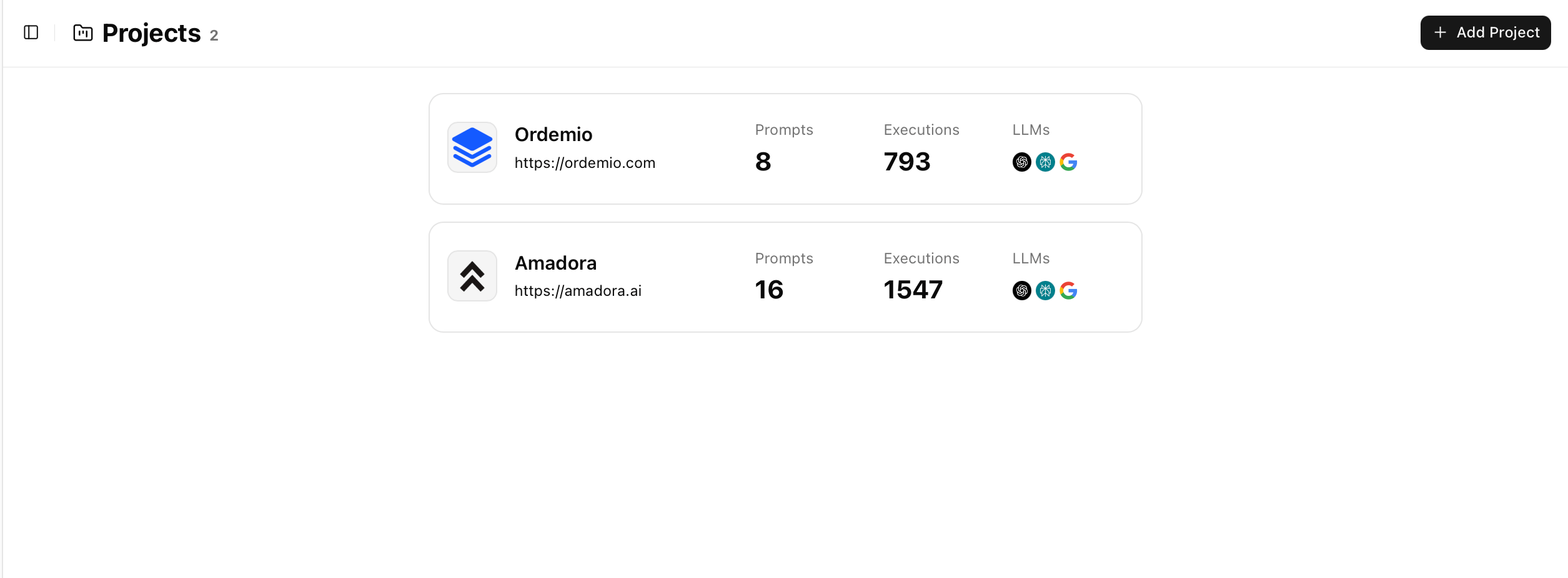 * Select **“All Projects”** from the dropdown to see your entire workspace.
* Track executions and prompts across all your brands in one list.
* Invite team members or share the dashboard link in a tap.
**We’ve switched to Real UI Tracing**
We have made a major infrastructure shift at Amadora AI. We are now switching all prompt tracing to scrape **real AI replies**—the exact same answers users see in the chatbot UIs—rather than relying on APIs.
**Why this matters for your AISO:**
* **True Accuracy:** Real UI replies are up to **50% different** from API-generated answers. Now you see exactly what the user sees.
* **More Data:** UI replies typically contain **2x more citation sources** and **1.5x query fan-outs**. This means significantly more data for your optimization strategy.
* **New Platforms:** We can now track **Gemini, Google AI Mode, Microsoft Copilot, and Grok.**
**Rolled out Trend Indicators**
To help you understand not just *how* you are performing, but *where* you are heading, we’ve rolled out Trend Indicators.
* Select **“All Projects”** from the dropdown to see your entire workspace.
* Track executions and prompts across all your brands in one list.
* Invite team members or share the dashboard link in a tap.
**We’ve switched to Real UI Tracing**
We have made a major infrastructure shift at Amadora AI. We are now switching all prompt tracing to scrape **real AI replies**—the exact same answers users see in the chatbot UIs—rather than relying on APIs.
**Why this matters for your AISO:**
* **True Accuracy:** Real UI replies are up to **50% different** from API-generated answers. Now you see exactly what the user sees.
* **More Data:** UI replies typically contain **2x more citation sources** and **1.5x query fan-outs**. This means significantly more data for your optimization strategy.
* **New Platforms:** We can now track **Gemini, Google AI Mode, Microsoft Copilot, and Grok.**
**Rolled out Trend Indicators**
To help you understand not just *how* you are performing, but *where* you are heading, we’ve rolled out Trend Indicators.
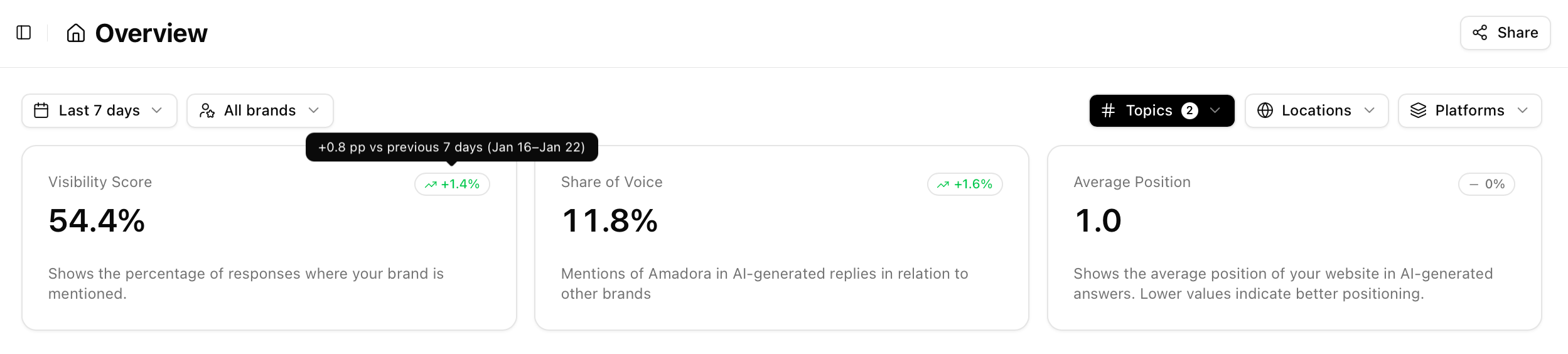 Now, you can instantly track performance changes compared to previous periods across your most critical metrics:
* Visibility Score
* Share of Voice
* Average Position
* Citation Counts
Green arrows mean growth. Red arrows mean it’s time to optimize.
Hover over the metrics for a deep dive into the absolute values and dates. This is just the first of several updates we are shipping this month to give you clearer insights.
**New Platform Updates: Trends, Sharing, and Speed!**
We’ve just rolled out a few exciting updates to make your data tracking even more powerful:
Now, you can instantly track performance changes compared to previous periods across your most critical metrics:
* Visibility Score
* Share of Voice
* Average Position
* Citation Counts
Green arrows mean growth. Red arrows mean it’s time to optimize.
Hover over the metrics for a deep dive into the absolute values and dates. This is just the first of several updates we are shipping this month to give you clearer insights.
**New Platform Updates: Trends, Sharing, and Speed!**
We’ve just rolled out a few exciting updates to make your data tracking even more powerful:
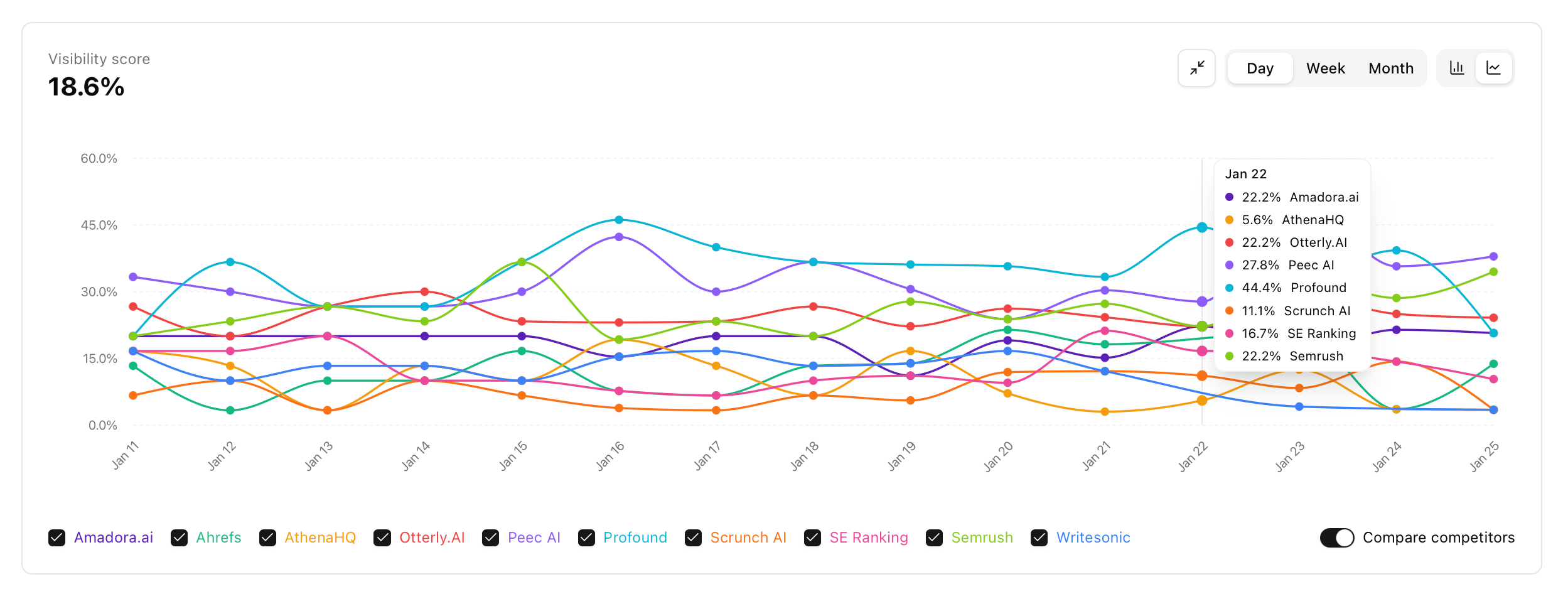 * **Advanced Trends & Graphs:** You can now visualize key metrics with daily, weekly, or monthly aggregations. Best of all? You can compare your brand’s performance directly against competitors and expand graphs to full-screen for a deeper look.
* **Client Dashboard Sharing:** Share your hard work effortlessly. Generate a read-only link from the top right corner so your clients can view dashboards and apply their own filters.
* **Faster Performance:** We’ve optimized the platform so your data now loads in seconds (or even faster!)
**Daily Tracking & Improved Brand Accuracy**
We’ve just rolled out two key updates to give you more reliable data:
* **Daily Prompt Runs:** We’ve moved from weekly to **daily prompt tracking**. Because LLM responses can vary significantly minute-to-minute, daily runs help smooth out fluctuations and provide much more accurate trend data.
* **Smarter Brand Analysis:** We’ve overhauled how we identify competitors. Using a new multi-step “prompt cascade,” the system is now much better at filtering out duplicate brands and ensuring every company is linked to its correct official website.
**Benchmark your brand: Competitor tracking is here!**
We just dropped a big update to help you see exactly how you stack up against the competition.
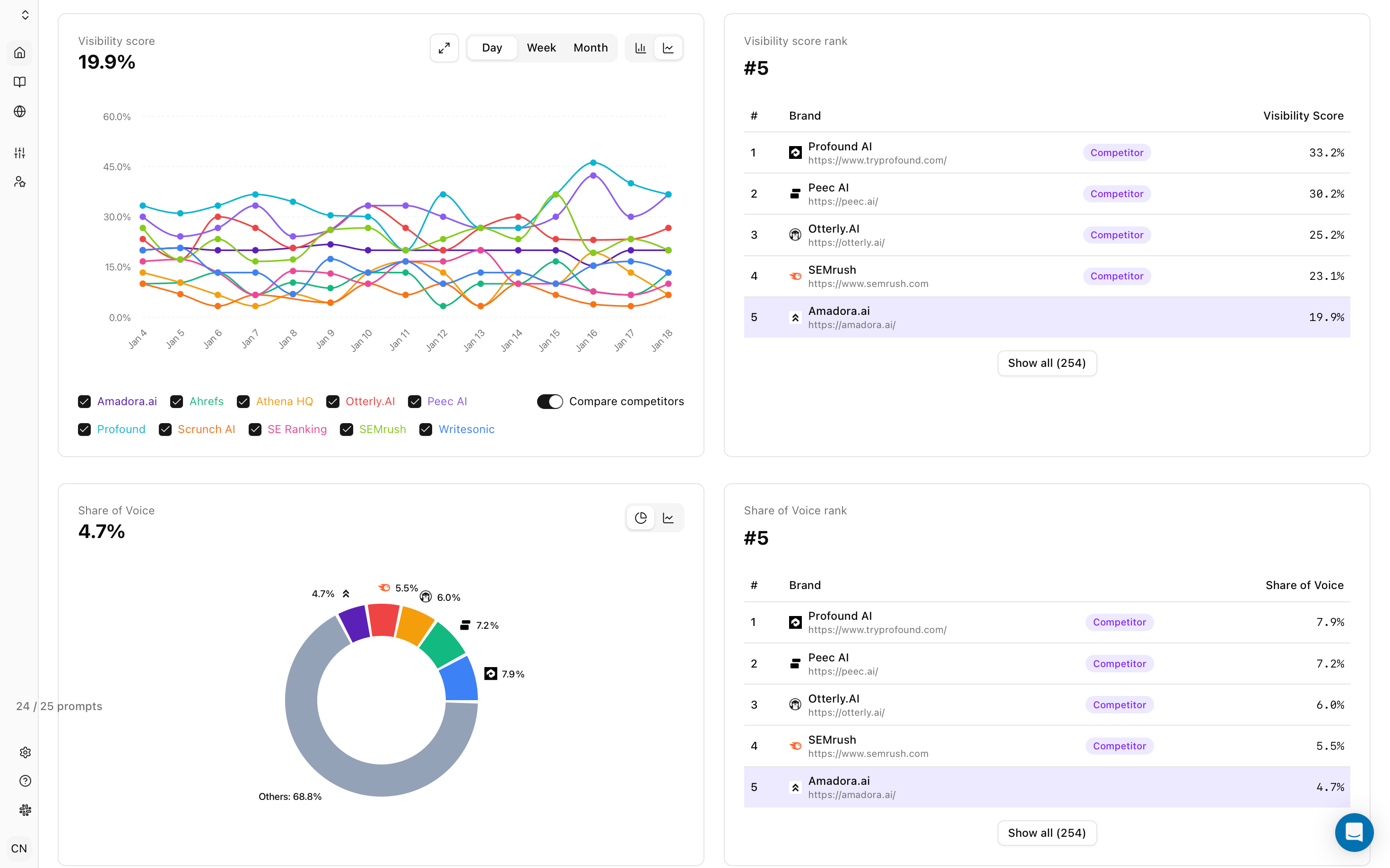
You can now discover rival brands, mark them as “Competitors,” and track them against your own metrics – like **Share of Voice** and **Visibility Score.**
* **Advanced Trends & Graphs:** You can now visualize key metrics with daily, weekly, or monthly aggregations. Best of all? You can compare your brand’s performance directly against competitors and expand graphs to full-screen for a deeper look.
* **Client Dashboard Sharing:** Share your hard work effortlessly. Generate a read-only link from the top right corner so your clients can view dashboards and apply their own filters.
* **Faster Performance:** We’ve optimized the platform so your data now loads in seconds (or even faster!)
**Daily Tracking & Improved Brand Accuracy**
We’ve just rolled out two key updates to give you more reliable data:
* **Daily Prompt Runs:** We’ve moved from weekly to **daily prompt tracking**. Because LLM responses can vary significantly minute-to-minute, daily runs help smooth out fluctuations and provide much more accurate trend data.
* **Smarter Brand Analysis:** We’ve overhauled how we identify competitors. Using a new multi-step “prompt cascade,” the system is now much better at filtering out duplicate brands and ensuring every company is linked to its correct official website.
**Benchmark your brand: Competitor tracking is here!**
We just dropped a big update to help you see exactly how you stack up against the competition.
You can now discover rival brands, mark them as “Competitors,” and track them against your own metrics – like **Share of Voice** and **Visibility Score.**
 **How to set it up:**
1. Head to the **Competitors** tab in the left menu.
**How to set it up:**
1. Head to the **Competitors** tab in the left menu. 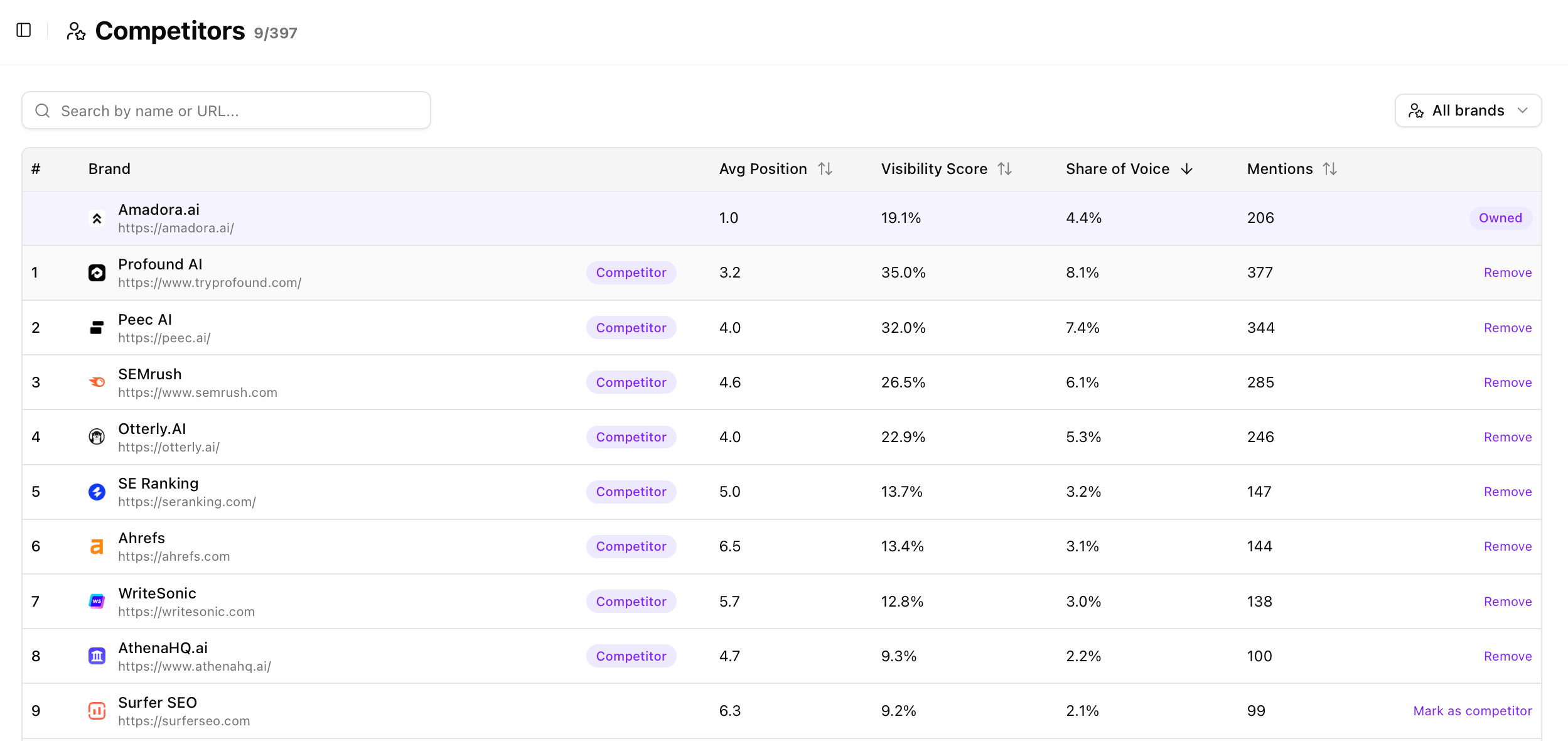 2. Add the brands you want to track.
3. Toggle between **“All Brands”** and **“Competitors”** on your dashboard to see the comparison.
**Bulk Exports, Date Filters, and more!**
We’ve been shipping features faster than I can write these posts, but I’m excited to officially kick off our first-ever product update.
Here’s what’s new this week:
* **Full CSV Exports:** You can now export all table data—including links, domains, and competitor lists — for deeper analysis in your own tools.
2. Add the brands you want to track.
3. Toggle between **“All Brands”** and **“Competitors”** on your dashboard to see the comparison.
**Bulk Exports, Date Filters, and more!**
We’ve been shipping features faster than I can write these posts, but I’m excited to officially kick off our first-ever product update.
Here’s what’s new this week:
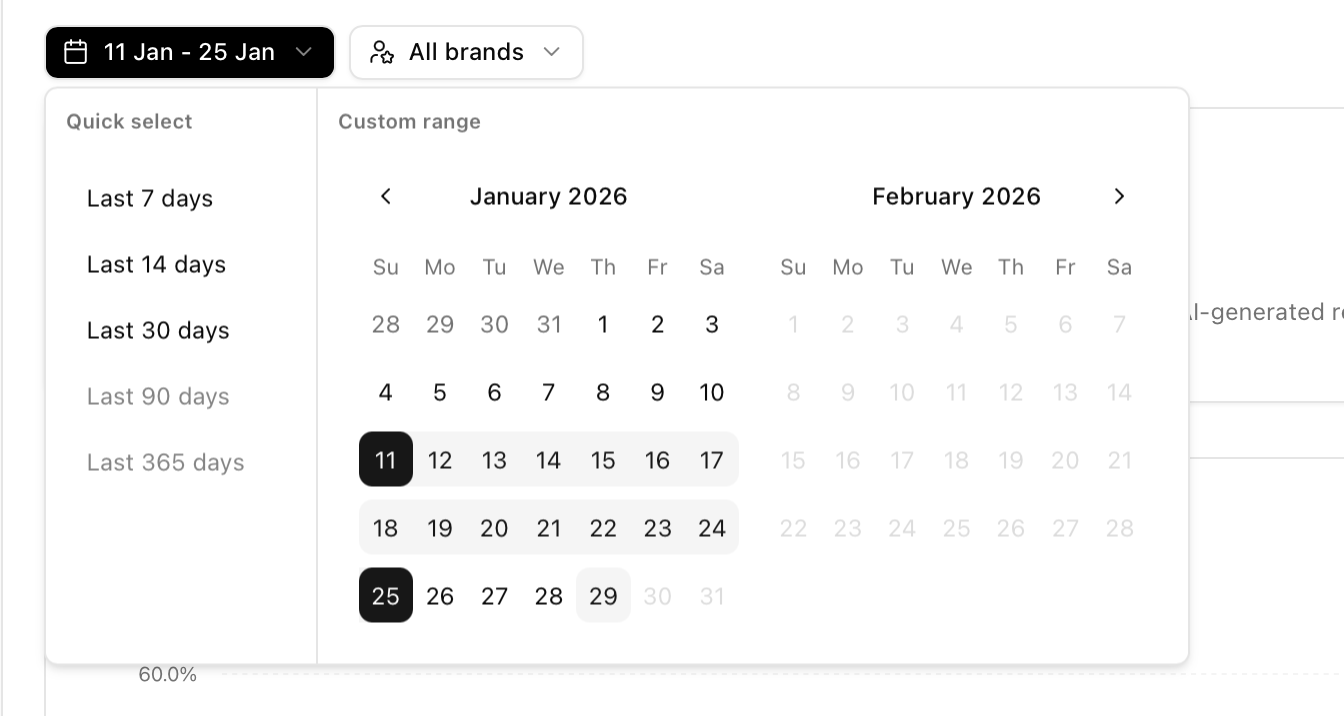
* **Full CSV Exports:** You can now export all table data—including links, domains, and competitor lists — for deeper analysis in your own tools. 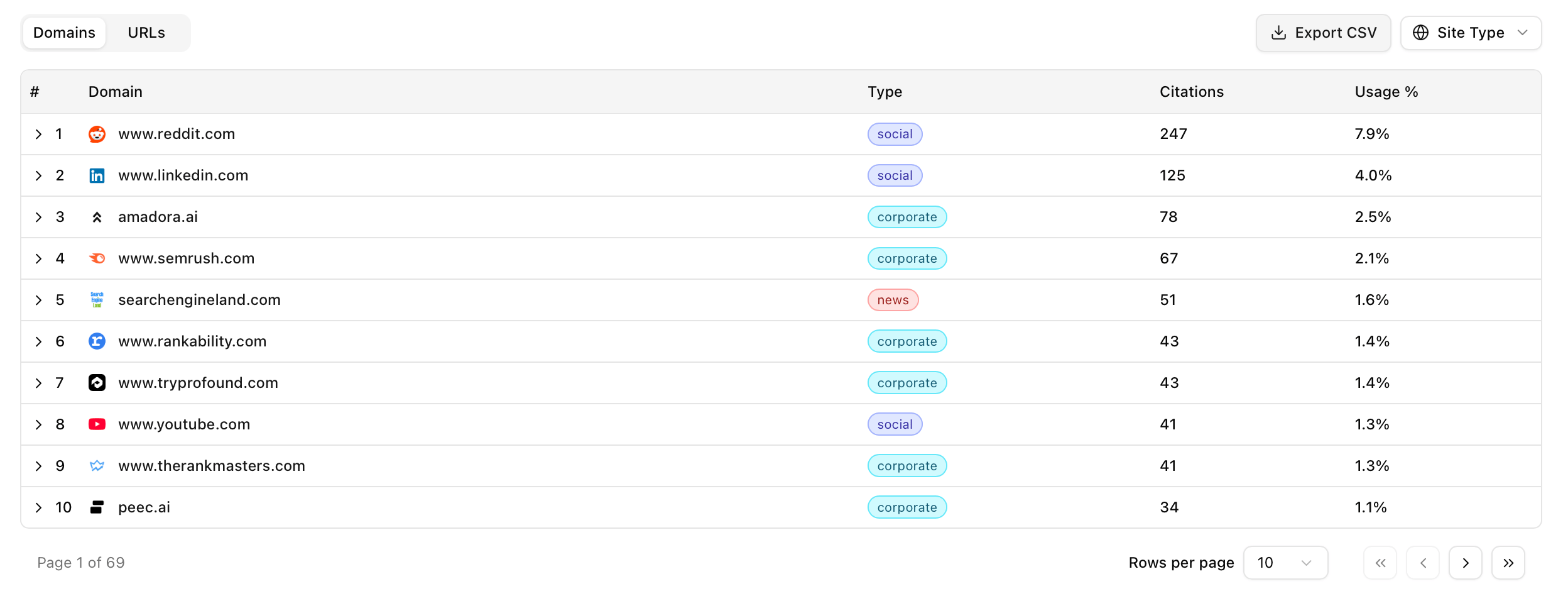 * **Custom Date Ranges:** No more “all or nothing” views. Zoom in on the specific period you need for your reports.
  * **Smarter Filters:** We’ve added clear visual indicators so you’ll know exactly which filters are active at a glance.